OpenSimWorld is the directory of 3D Virtual Worlds based on OpenSimulator and connected through the HyperGrid. Learn More


|
FEATURED Moonrose Shopping 1 Users 186 0 A Moonrose a shopping experience of a special kind
we are diverse offer women as well as men clothes
Mesh body for women Reborn/LaraX Legacy Arthemis as well as for men Chonsu body. We are always look... |



Country Kitchen - Empty Shelves and counters ready for decor - Chairs are animated / can sit and eat / rezz drinks for you/ just add a plate of food and you can eat!
The Social Mouse Mall Is Happy to Welcome Betty The Fashionista! Come get her *Newest* Styling Proposals - Betty Provides Hair, and ALL ACCESSORIES with her outfits YUm YUM come and get it!!!!


3DLove event, fraternization. Come join this great party you and our guest. White
Our new 2019 Schedule: Every Friday at 6pm Pacific, live entertainment or DJ. 7pm an after-party of fun. We rotate our entertainers and our games to keep things fresh, so make us your Friday night destination!



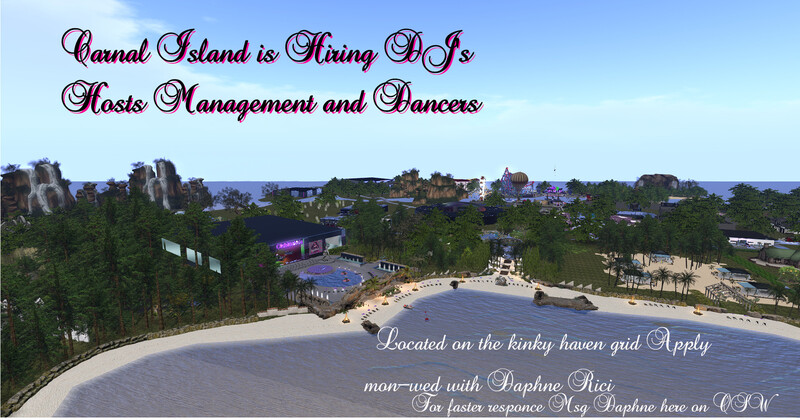
Hi Everyone. We are announcing we have Haven Farm and Haven Safari regions. The Haven farm is a Satyr farm with plenty of freebies for you to enhance your own farm. We also have a Box of Satyr farm if your want to start your own. And we also Have Haven Safari with lions elephants and more. Rez a vehicle or fly around and explore. We hope you enjoy your visit. Here is the link to the farm and you can use the tp board to get to the Safari. Enjoy! :)
thehavengrid.outworldz.net:8002:Haven Farm
thehavengrid.outworldz.net:8002:Haven Farm



This is a futuristic region fun for all. Plenty of freebies. Original creations from owners and items from opensim creators. Enjoy!
Christmas region brings the joy and colors of the season year round. Great Christmas music as well. Drop by for a little Christmas spirit before your day and adventures continue.



Get ready for a fun, family friendly adventure! This ride features scripted NPC Wizard Battles and much more! Total ride time is approx 7 minutes.
Part of the That Place Amusement Grd!









💋 Petite – klein, aber ganz groß im Auftritt
Frech, funkelnd, fabelhaft.
Petite spielt nicht brav – sie verführt mit Stil und einem Hauch Unverschämtheit.
Ein bisschen Spitze, ein bisschen Glanz, und ganz viel „Ich kann, wenn ich will“.
Wer sagt, Größe zählt, hat Petite noch nicht gesehen.
Petite – die frechste Versuchung seit Luxus.
Frech, funkelnd, fabelhaft.
Petite spielt nicht brav – sie verführt mit Stil und einem Hauch Unverschämtheit.
Ein bisschen Spitze, ein bisschen Glanz, und ganz viel „Ich kann, wenn ich will“.
Wer sagt, Größe zählt, hat Petite noch nicht gesehen.
Petite – die frechste Versuchung seit Luxus.

Freitag 29.5.2026
Rock-House
mit DJ Anachron
Beginn 20:00 Uhr
Der Streusand-Effekt
Ende ca. 22:00 Uhr.
Hypergrid : dorenas-world.de:8002:Nihilon
-----------------------------------------------------------------------
Friday, May 29, 2026
Rock-House
with DJ Anachron
Starts at 8:00 PM
The Sand Effect
Ends around 10:00 PM
Hypergrid: dorenas-world.de:8002:Nihilon
Rock-House
mit DJ Anachron
Beginn 20:00 Uhr
Der Streusand-Effekt
Ende ca. 22:00 Uhr.
Hypergrid : dorenas-world.de:8002:Nihilon
-----------------------------------------------------------------------
Friday, May 29, 2026
Rock-House
with DJ Anachron
Starts at 8:00 PM
The Sand Effect
Ends around 10:00 PM
Hypergrid: dorenas-world.de:8002:Nihilon
💚Morning walk💚
**** OPENSIM ONLINE WEATHER SYSTEM V8A UPDATED RELEASE *****
AVAILABLE FOR FREE AND FULLPERM AT WEATHER SECTOR
************** WHAT’S NEW IN V8A COMPARED TO V8? ************
1- Added a LIGHTHOUSE addon - more realism to your sim - it plays the fog horn when needed (on certain weather conditions as foggy or mist, for instance);
2- The "day" sound was changed for something more relaxing,smooth, subtle than the previous version.
IF YOU HAVE ALREADY REZZED THE OPENSIM ONLINE WEATHER SYSTEM IN YOUR REGION, YOU ONLY NEED TO ADD THE LIGHTHOUSE AND SOUNBOXES. THATS ALL - IT WORKS ON PREVIOUS VERSIONS AS V8 AND V7
-----------------------------------------------------------------------------------------🌦 Opensim Online Weather System V8A 🌦
Bring your OpenSim region to life with real-time, dynamic weather!
✨ Features
🌍 Live weather updates for any city worldwide
🌡 Temperature shown in both °C and °F
🕒 Local time (AM/PM and 24 hours)
⛅ Realistic conditions: rain, snow, drizzle, thunderstorm; EEP SKY changes automatically on your region!
🎨 Automatic weather textures and matching sounds
🕒 Customizable update interval
💡 Low-lag and optimized for OpenSim
🛠 Easy setup via a dialog menu
Transform your region instantly — rez the system, enter your city and API key, and enjoy dynamic weather all year round!
📦 WHAT’S INCLUDED ON VENDOR V8A:
- SCRIPTS USED V8A (BOX);
- SOUNDS USED V8A (BOX);
- TEXTURES USED V8A (BOX);
-LOGO USED V8A (BOX);
- WEATHER SCULPT SET V8A (BOX);
- OpenSIM Online ADDON (SLAVE) V8A 01 prim;
- OpenSIM Online Weather Display Board V8A (SLAVE) 11 prims;
- OpenSIM Online Weather Controller V8A (MASTER) 01 prim;
- OpenSIM ONLINE THUNDERBOX V8A (SLAVE)(INVISIBLE by default);
- OpenSIM ONLINE SOUNDBOX V8A (SLAVE MAIN);
- OpenSIM ONLINE SOUNDBOX V8A (SLAVE SLAVE);
- OpenSIM Online Northern Lights V8A (SLAVE);
- OpenSIM Online Cloud V8A (SLAVE);
- OPENSIM WEATHER CODES UPDT 10JAN26 (NOTECARD);
- OPENSIM Thunder Caller (MASTER) HUD V8A (add me)";
- OPEMSIM Fog Caller HUD V8A (MASTER) (add me);
- READ ME PLEASE!! (ENGLISH) v.26MAY26 (NOTECARD).
------------------------------------------------------------------------------------
⚙️ HOW TO USE
1 – Get your API Key
API = Application Programming Interface. It lets the weather script fetch live data from a forescast website.
Steps:
Go to: https://openweathermap.org
Sign up or log in (website will prompt you to paid subscription but choose the free one!!)
Open your profile → API keys
Create a key → copy it
2 – Rez the Weather Sculpts (You will find them inside the box "WEATHER SCULPT SET V8A (BOX)".
Rez the weather sculpts across your region - around buildings etc -
I recommend going on infra-red mode (Firestorm) by clicking CONTROL+ALT+T.
Select all sculpts →LINK THEM ALL and insert on the root prim (just select them all) and insert the script called "OpenSIM ONLINE SCULPT V8A (SLAVE)". (*)
(*) THIS SCRIPT AND ALL OTHERS USED ON THIS SYSTEM can be found at the box called "SCRIPTS USED V8A (BOX)".
3- Insert some of the textures included on the "TEXTURES FOR SCULPTS V8A (BOX)" that can be found inside the box "SCRIPTS USED V8A (BOX)"
Textures on the root prim of the linked sculpts MUST be "clear,r1,r2,r3,r4,sr1,sr2,sr3,s1,s2,s3 and s4 to script work perfectly. By default, all pieces of sculpts have already the needed textures so to not worry :)
4 –SET UP THE SYSTEM:
Rez the controller "OpenSIM Online Weather Controller V8A (MASTER) 02 prims" and click it. A dialog menu (blue menu) will prompt:
-> Choose the name of the city (English only - other languages or misspelled, script won`t fetch information). If a city name like Springfield (USA) is selected and there are 5 on that country, script will select a random one - on these cases, type "Springfield,IL,US" (Illinois, United States) so script will fetch information from the correct place. Another option is also select by lat/lon mode (latitude/longitude).
-> Click again, and insert the API KEY generated by the website.
-> Click once more, now insert the interval. and that s it.
It will send information to all soundboxes, sculpts, thunderboxes rezzed if in within same region!
Rez the display board next to the controller "OpenSIM Online Weather Display Board V8A (SLAVE) 11 prims"
-> Click the controller and click the "Update Now" button.
This action updates the info on the display board.
***** Please be patient. All changes on the dialog box, script may take up to 15 seconds to fetch the information!*****************************
5 – Optional: Add Sound & Thunder & Cloud & Nothern Lights:
Plays drizzle, rain, and blizzard sounds when told by the controller..
If no bad weather: plays birds (day) or crickets (night).
In version V8A, there are now two types of SoundBoxes:
OpenSIM ONLINE SOUNDBOX V8A (SLAVE MAIN);
OpenSIM ONLINE SOUNDBOX V8A (SLAVE SLAVE).
How to set up:
-Rez as many “OpenSIM ONLINE SOUNDBOX V8A (SLAVE SLAVE)” objects as needed in your region (optional);
- Link them all together;
- Rez only one “OpenSIM ONLINE SOUNDBOX V8A (SLAVE MAIN)”;
- Link all the previously linked SoundBoxes to this one.
Important: For this to work, “OpenSIM ONLINE SOUNDBOX V8A (SLAVE MAIN)” must be the root prim (the last object selected when linking). It is the box that contains the script.
And voilà — you now use one script for all SoundBoxes, and the sound will be emitted from each of them in near-perfect synchronization.
(ps) I recommend rezing them close to buildings or common public areas. DO NOT rez the sounboxes too close to each other. Believe me ,Spam sound will be unpleasant for the visitors and it won`t sound natural to your ears!
SOUNDBOXES NOW HAVE THE NIGHT SOUND (THE CRICKETS) SUPPRESSION!
* The script checks the object’s latitude and the current month!
* Tropics (≤ latitude 30°) → night sounds always play.
* Polar regions (≥ latitude 60°) → night sounds are always blocked.
* Mid-latitudes (latitude 30°–60°) → gradual suppression:
* In winter months (depending on latitude), night sounds are blocked.
* In summer months, "night" sounds play normally.
* The script stops "night" sound if suppression applies; "day","rain", "drizzle" and "snow" sounds always play normally.
---------------------------------------------------------------------------------------------
-> Opensim ONLINE THUNDERBOX V8A (SLAVE):
Plays a thunder sound and flashes lightning when told by the controller.
When rezzed, by default it is invisible, please go to infra-red mode (control alt+t) to see and resize it to your needs.
PS. To test it, please add as a hud (or just add it) the "OPENSIM
Thunder Caller (MASTER) HUD" and click it. Once you see the size and position are ok, this script is no longer necessary.
Be patient. Thunder sound and the lighting will show on a random interval of time from 10 seconds to 05 minutes.
----------------------------------------------------------------------------------------------
-> OpenSIM ONLINE CLOUD V8A (SLAVE):
4x4 sized sculpt cloud to rez in your region - It will show when the weather conditions told by the controller when it asks to. Otherwise it will remain invisible.
No setup needed
----------------------------------------------------------------------------------------------
-> OpenSIM ONLINE Aurora Borealis V8A (SLAVE).
4x4 sized mesh to rez in your region - it will show only at nights (sun position OpenSIM ONLINE EEP ADDON (SLAVE) V8A
This add-on automatically changes the region EEP sky according to the weather conditions received from the OpenSim Online Weather Controller.
1. Rez the object named:
"OpenSIM Online EEP ADDON (SLAVE) V8A 01 prim"
2. Place it anywhere in the region.
3. Ensure the following EEP settings are present inside the prim inventory:
TCLEAR
PCLEAR
PCLOUDY
CLOUDY
FOGGY
4. The script will listen for weather data sent by the Weather Controller and automatically apply the corresponding EEP sky.
PERMISSIONS REQUIRED
The object must be rezzed by the Region Owner or by a user with Estate Manager rights.
Otherwise the script will not have permission to change the region environment.
IMPORTANT NOTES
• This add-on changes only the region EEP sky preset according to the weather condition.
• It does NOT modify the region time offset.
• It does NOT change the day length or sun cycle.
• These parameters remain controlled by the region’s existing environment settings.
OPERATION
Once rezzed and running, the add-on works automatically.
No configuration or user interaction is required.
------------------------------------------------------------------------------------------
-OpenSIM LIGHTHOUSE ADDON (SLAVE) V8A — 07 prims
OVERVIEW
--------
The Lighthouse Add-on integrates with the OpenSim Online Weather System. It listens for weather data broadcast by the Weather Controller (Master) and responds automatically:
• When fog or reduced-visibility conditions are detected, the lights turn ON and
a fog horn sounds at regular intervals. (once each 90 seconds)
• When conditions clear, the lights return to their normal automatic day/night cycle.
IMPORTANT — READ BEFORE REZZING
---------------------------------
This add-on comes in TWO separate pieces:
1. The lighthouse building
2. The light beam with reflector
⚠ DO NOT LINK THEM TOGETHER. They must remain as two independent objects.
SETUP
-----
Simply rez both pieces in your region. No additional configuration is required.
The system works SIM-wide regardless of where the objects are placed.
LIGHT MODES
-----------
Click the reflector (owner only) to cycle through the available light modes:
Mode 0 — Lights Always Off
Mode 1 — Lights Always On
Mode 2 — Automatic (day/night cycle) ← default
Note: During active fog conditions, the lights and fog horn sound are always forced ON regardless of the selected mode. When conditions clear, the previous mode resumes automatically.
TESTING
-------
To verify the lighthouse is working correctly, attach the included HUD:
"OPENSIM Lighthouse FOG HORN Caller (MASTER) HUD V8A (add me)"
This HUD allows you to manually trigger the fog horn and confirm the system
is responding as expected.
WEATHER CONDITIONS THAT ACTIVATE THE SYSTEM
---------------------------------------------
The lighthouse activates under the following weather conditions:
Mist · Smoke · Haze · Dust Whirls · Fog
Sand · Dust · Volcanic Ash · Squalls · Tornado
-------------------------------------------------------------------------------------------
-------------------------------------------------------------------------------------------
-------------------------------------------------------------------------------------------
📌 Notes
-Keep your API key private — free plan allows ~1,000 calls/day (enough if you set 15-minute intervals).
-Make sure city name is spelled correctly in English.
After changing settings or resetting the script, it may take up to 15 seconds for the menu to reload and fetch the new information to display.
BE PATIENT!
Don’t worry — your settings are saved inside the prim in case of script replacement, script or SIM reset!
--------------------------------------------------------------------------------------------
--------------------------------------------------------------------------------------------
--------------------------------------------------------------------------------------------
FAQ
1 – What does “Master” and “Slave” mean?
Master script = The boss.
Goes online to fetch live weather.
Sends the result (via channel messages) to all connected objects.
Slave script = The worker.
Never goes online (saves lag). Just listens for the Master’s messages and updates textures, sounds, or lights.
📡 Example:
Master says: “Weather code 502 = heavy rain”.
All Slaves hear it → they switch to rain textures and respective sound.
👉 In short:
Master = speaks.
Slave = listens.
Channel = the walkie-talkie frequency they use.
2 – Does the script works on a certain distance or on the whole region?
- It works SIM-wide, no matter if your SIM is 1x1 or 12x12 or if any object from this weather system is rezzed 1,000 meters high (*). it will work!
(*) Certain grids limit script activity up to - from 4,000 to 10,000 meters max high - check with your grid owner!
3- Can I rez more than 1 cluster of sculpts on my region?
Yes! Here an example on what I do on my 8x8 SIM called TROMSO: 8x8 VAR with 4 different places, so I put the "OpenSIM ONLINE SCULPT V8A (SLAVE)" on each of the clusters!. no matter how many cluster you have on your region, they ALL call just a single API from website!
SO LOW LAG FOR YOUR REGION!
4- I rezzed the SOUND BOXES but I only hear the birds or just hear the crickets?
- Make sure the sky (EEP) (**) is time zoned. If you play day on your sim (static sky), script reads the sun position on the sky. If sun is =>8 degrees above the horizon ,script will be told its DAY! If < 8 degrees, script will be told its NIGHT!
(**) EEP that come with this weather system are properly time zoned.
5- I rezzed the "OpenSIM Online Cloud V8A (SLAVE)" and I don`t see anything!
- If you have rezzed the controller before, if it fetches info from website and it says it not cloudy", the "OpenSIM Online Cloud V8A (SLAVE)" will remain invisible (100% transparent). - One still can see it on infra red mode (CONTROL+ALT+T)
6- Why all these boxes with the scripts, sounds, textures? Do I need them?
- It just in case one deletes something by accident so one can always recover it. Also, I do it for preventing assets lost -specially if one is from other grid!
7- I rezzed my controller, set all sculpts and sound box. I select city but nothing work. What could it be?
- Make sure city is well written in English. Also, it happens that on 1st time one rezzes the controller, it can act like this. so just reset script!
----------------------------------------------------------------------------------
🎉 Final Notes
This script was originally created years ago for my region by my friend Satyr Aeon (aka Malaka) and now it has been fully enhanced/ modified by ChatGPT, DeepSeek AI, Gemini AI and Claude AI.
Enjoy and share it — always FREE & FULL PERM!
— Jimmy Olsen
AVAILABLE FOR FREE AND FULLPERM AT WEATHER SECTOR
************** WHAT’S NEW IN V8A COMPARED TO V8? ************
1- Added a LIGHTHOUSE addon - more realism to your sim - it plays the fog horn when needed (on certain weather conditions as foggy or mist, for instance);
2- The "day" sound was changed for something more relaxing,smooth, subtle than the previous version.
IF YOU HAVE ALREADY REZZED THE OPENSIM ONLINE WEATHER SYSTEM IN YOUR REGION, YOU ONLY NEED TO ADD THE LIGHTHOUSE AND SOUNBOXES. THATS ALL - IT WORKS ON PREVIOUS VERSIONS AS V8 AND V7
-----------------------------------------------------------------------------------------🌦 Opensim Online Weather System V8A 🌦
Bring your OpenSim region to life with real-time, dynamic weather!
✨ Features
🌍 Live weather updates for any city worldwide
🌡 Temperature shown in both °C and °F
🕒 Local time (AM/PM and 24 hours)
⛅ Realistic conditions: rain, snow, drizzle, thunderstorm; EEP SKY changes automatically on your region!
🎨 Automatic weather textures and matching sounds
🕒 Customizable update interval
💡 Low-lag and optimized for OpenSim
🛠 Easy setup via a dialog menu
Transform your region instantly — rez the system, enter your city and API key, and enjoy dynamic weather all year round!
📦 WHAT’S INCLUDED ON VENDOR V8A:
- SCRIPTS USED V8A (BOX);
- SOUNDS USED V8A (BOX);
- TEXTURES USED V8A (BOX);
-LOGO USED V8A (BOX);
- WEATHER SCULPT SET V8A (BOX);
- OpenSIM Online ADDON (SLAVE) V8A 01 prim;
- OpenSIM Online Weather Display Board V8A (SLAVE) 11 prims;
- OpenSIM Online Weather Controller V8A (MASTER) 01 prim;
- OpenSIM ONLINE THUNDERBOX V8A (SLAVE)(INVISIBLE by default);
- OpenSIM ONLINE SOUNDBOX V8A (SLAVE MAIN);
- OpenSIM ONLINE SOUNDBOX V8A (SLAVE SLAVE);
- OpenSIM Online Northern Lights V8A (SLAVE);
- OpenSIM Online Cloud V8A (SLAVE);
- OPENSIM WEATHER CODES UPDT 10JAN26 (NOTECARD);
- OPENSIM Thunder Caller (MASTER) HUD V8A (add me)";
- OPEMSIM Fog Caller HUD V8A (MASTER) (add me);
- READ ME PLEASE!! (ENGLISH) v.26MAY26 (NOTECARD).
------------------------------------------------------------------------------------
⚙️ HOW TO USE
1 – Get your API Key
API = Application Programming Interface. It lets the weather script fetch live data from a forescast website.
Steps:
Go to: https://openweathermap.org
Sign up or log in (website will prompt you to paid subscription but choose the free one!!)
Open your profile → API keys
Create a key → copy it
2 – Rez the Weather Sculpts (You will find them inside the box "WEATHER SCULPT SET V8A (BOX)".
Rez the weather sculpts across your region - around buildings etc -
I recommend going on infra-red mode (Firestorm) by clicking CONTROL+ALT+T.
Select all sculpts →LINK THEM ALL and insert on the root prim (just select them all) and insert the script called "OpenSIM ONLINE SCULPT V8A (SLAVE)". (*)
(*) THIS SCRIPT AND ALL OTHERS USED ON THIS SYSTEM can be found at the box called "SCRIPTS USED V8A (BOX)".
3- Insert some of the textures included on the "TEXTURES FOR SCULPTS V8A (BOX)" that can be found inside the box "SCRIPTS USED V8A (BOX)"
Textures on the root prim of the linked sculpts MUST be "clear,r1,r2,r3,r4,sr1,sr2,sr3,s1,s2,s3 and s4 to script work perfectly. By default, all pieces of sculpts have already the needed textures so to not worry :)
4 –SET UP THE SYSTEM:
Rez the controller "OpenSIM Online Weather Controller V8A (MASTER) 02 prims" and click it. A dialog menu (blue menu) will prompt:
-> Choose the name of the city (English only - other languages or misspelled, script won`t fetch information). If a city name like Springfield (USA) is selected and there are 5 on that country, script will select a random one - on these cases, type "Springfield,IL,US" (Illinois, United States) so script will fetch information from the correct place. Another option is also select by lat/lon mode (latitude/longitude).
-> Click again, and insert the API KEY generated by the website.
-> Click once more, now insert the interval. and that s it.
It will send information to all soundboxes, sculpts, thunderboxes rezzed if in within same region!
Rez the display board next to the controller "OpenSIM Online Weather Display Board V8A (SLAVE) 11 prims"
-> Click the controller and click the "Update Now" button.
This action updates the info on the display board.
***** Please be patient. All changes on the dialog box, script may take up to 15 seconds to fetch the information!*****************************
5 – Optional: Add Sound & Thunder & Cloud & Nothern Lights:
Plays drizzle, rain, and blizzard sounds when told by the controller..
If no bad weather: plays birds (day) or crickets (night).
In version V8A, there are now two types of SoundBoxes:
OpenSIM ONLINE SOUNDBOX V8A (SLAVE MAIN);
OpenSIM ONLINE SOUNDBOX V8A (SLAVE SLAVE).
How to set up:
-Rez as many “OpenSIM ONLINE SOUNDBOX V8A (SLAVE SLAVE)” objects as needed in your region (optional);
- Link them all together;
- Rez only one “OpenSIM ONLINE SOUNDBOX V8A (SLAVE MAIN)”;
- Link all the previously linked SoundBoxes to this one.
Important: For this to work, “OpenSIM ONLINE SOUNDBOX V8A (SLAVE MAIN)” must be the root prim (the last object selected when linking). It is the box that contains the script.
And voilà — you now use one script for all SoundBoxes, and the sound will be emitted from each of them in near-perfect synchronization.
(ps) I recommend rezing them close to buildings or common public areas. DO NOT rez the sounboxes too close to each other. Believe me ,Spam sound will be unpleasant for the visitors and it won`t sound natural to your ears!
SOUNDBOXES NOW HAVE THE NIGHT SOUND (THE CRICKETS) SUPPRESSION!
* The script checks the object’s latitude and the current month!
* Tropics (≤ latitude 30°) → night sounds always play.
* Polar regions (≥ latitude 60°) → night sounds are always blocked.
* Mid-latitudes (latitude 30°–60°) → gradual suppression:
* In winter months (depending on latitude), night sounds are blocked.
* In summer months, "night" sounds play normally.
* The script stops "night" sound if suppression applies; "day","rain", "drizzle" and "snow" sounds always play normally.
---------------------------------------------------------------------------------------------
-> Opensim ONLINE THUNDERBOX V8A (SLAVE):
Plays a thunder sound and flashes lightning when told by the controller.
When rezzed, by default it is invisible, please go to infra-red mode (control alt+t) to see and resize it to your needs.
PS. To test it, please add as a hud (or just add it) the "OPENSIM
Thunder Caller (MASTER) HUD" and click it. Once you see the size and position are ok, this script is no longer necessary.
Be patient. Thunder sound and the lighting will show on a random interval of time from 10 seconds to 05 minutes.
----------------------------------------------------------------------------------------------
-> OpenSIM ONLINE CLOUD V8A (SLAVE):
4x4 sized sculpt cloud to rez in your region - It will show when the weather conditions told by the controller when it asks to. Otherwise it will remain invisible.
No setup needed
----------------------------------------------------------------------------------------------
-> OpenSIM ONLINE Aurora Borealis V8A (SLAVE).
4x4 sized mesh to rez in your region - it will show only at nights (sun position OpenSIM ONLINE EEP ADDON (SLAVE) V8A
This add-on automatically changes the region EEP sky according to the weather conditions received from the OpenSim Online Weather Controller.
1. Rez the object named:
"OpenSIM Online EEP ADDON (SLAVE) V8A 01 prim"
2. Place it anywhere in the region.
3. Ensure the following EEP settings are present inside the prim inventory:
TCLEAR
PCLEAR
PCLOUDY
CLOUDY
FOGGY
4. The script will listen for weather data sent by the Weather Controller and automatically apply the corresponding EEP sky.
PERMISSIONS REQUIRED
The object must be rezzed by the Region Owner or by a user with Estate Manager rights.
Otherwise the script will not have permission to change the region environment.
IMPORTANT NOTES
• This add-on changes only the region EEP sky preset according to the weather condition.
• It does NOT modify the region time offset.
• It does NOT change the day length or sun cycle.
• These parameters remain controlled by the region’s existing environment settings.
OPERATION
Once rezzed and running, the add-on works automatically.
No configuration or user interaction is required.
------------------------------------------------------------------------------------------
-OpenSIM LIGHTHOUSE ADDON (SLAVE) V8A — 07 prims
OVERVIEW
--------
The Lighthouse Add-on integrates with the OpenSim Online Weather System. It listens for weather data broadcast by the Weather Controller (Master) and responds automatically:
• When fog or reduced-visibility conditions are detected, the lights turn ON and
a fog horn sounds at regular intervals. (once each 90 seconds)
• When conditions clear, the lights return to their normal automatic day/night cycle.
IMPORTANT — READ BEFORE REZZING
---------------------------------
This add-on comes in TWO separate pieces:
1. The lighthouse building
2. The light beam with reflector
⚠ DO NOT LINK THEM TOGETHER. They must remain as two independent objects.
SETUP
-----
Simply rez both pieces in your region. No additional configuration is required.
The system works SIM-wide regardless of where the objects are placed.
LIGHT MODES
-----------
Click the reflector (owner only) to cycle through the available light modes:
Mode 0 — Lights Always Off
Mode 1 — Lights Always On
Mode 2 — Automatic (day/night cycle) ← default
Note: During active fog conditions, the lights and fog horn sound are always forced ON regardless of the selected mode. When conditions clear, the previous mode resumes automatically.
TESTING
-------
To verify the lighthouse is working correctly, attach the included HUD:
"OPENSIM Lighthouse FOG HORN Caller (MASTER) HUD V8A (add me)"
This HUD allows you to manually trigger the fog horn and confirm the system
is responding as expected.
WEATHER CONDITIONS THAT ACTIVATE THE SYSTEM
---------------------------------------------
The lighthouse activates under the following weather conditions:
Mist · Smoke · Haze · Dust Whirls · Fog
Sand · Dust · Volcanic Ash · Squalls · Tornado
-------------------------------------------------------------------------------------------
-------------------------------------------------------------------------------------------
-------------------------------------------------------------------------------------------
📌 Notes
-Keep your API key private — free plan allows ~1,000 calls/day (enough if you set 15-minute intervals).
-Make sure city name is spelled correctly in English.
After changing settings or resetting the script, it may take up to 15 seconds for the menu to reload and fetch the new information to display.
BE PATIENT!
Don’t worry — your settings are saved inside the prim in case of script replacement, script or SIM reset!
--------------------------------------------------------------------------------------------
--------------------------------------------------------------------------------------------
--------------------------------------------------------------------------------------------
FAQ
1 – What does “Master” and “Slave” mean?
Master script = The boss.
Goes online to fetch live weather.
Sends the result (via channel messages) to all connected objects.
Slave script = The worker.
Never goes online (saves lag). Just listens for the Master’s messages and updates textures, sounds, or lights.
📡 Example:
Master says: “Weather code 502 = heavy rain”.
All Slaves hear it → they switch to rain textures and respective sound.
👉 In short:
Master = speaks.
Slave = listens.
Channel = the walkie-talkie frequency they use.
2 – Does the script works on a certain distance or on the whole region?
- It works SIM-wide, no matter if your SIM is 1x1 or 12x12 or if any object from this weather system is rezzed 1,000 meters high (*). it will work!
(*) Certain grids limit script activity up to - from 4,000 to 10,000 meters max high - check with your grid owner!
3- Can I rez more than 1 cluster of sculpts on my region?
Yes! Here an example on what I do on my 8x8 SIM called TROMSO: 8x8 VAR with 4 different places, so I put the "OpenSIM ONLINE SCULPT V8A (SLAVE)" on each of the clusters!. no matter how many cluster you have on your region, they ALL call just a single API from website!
SO LOW LAG FOR YOUR REGION!
4- I rezzed the SOUND BOXES but I only hear the birds or just hear the crickets?
- Make sure the sky (EEP) (**) is time zoned. If you play day on your sim (static sky), script reads the sun position on the sky. If sun is =>8 degrees above the horizon ,script will be told its DAY! If < 8 degrees, script will be told its NIGHT!
(**) EEP that come with this weather system are properly time zoned.
5- I rezzed the "OpenSIM Online Cloud V8A (SLAVE)" and I don`t see anything!
- If you have rezzed the controller before, if it fetches info from website and it says it not cloudy", the "OpenSIM Online Cloud V8A (SLAVE)" will remain invisible (100% transparent). - One still can see it on infra red mode (CONTROL+ALT+T)
6- Why all these boxes with the scripts, sounds, textures? Do I need them?
- It just in case one deletes something by accident so one can always recover it. Also, I do it for preventing assets lost -specially if one is from other grid!
7- I rezzed my controller, set all sculpts and sound box. I select city but nothing work. What could it be?
- Make sure city is well written in English. Also, it happens that on 1st time one rezzes the controller, it can act like this. so just reset script!
----------------------------------------------------------------------------------
🎉 Final Notes
This script was originally created years ago for my region by my friend Satyr Aeon (aka Malaka) and now it has been fully enhanced/ modified by ChatGPT, DeepSeek AI, Gemini AI and Claude AI.
Enjoy and share it — always FREE & FULL PERM!
— Jimmy Olsen

HG SAFARI just got to try this out today and NOW the AXIS version is in the "script area" of this website. Now you can have a conversation or even design a personality to go with your NPC.
More info https://opensimliving.blogspot.com/2026/05/jesternpc-speec...
More info https://opensimliving.blogspot.com/2026/05/jesternpc-speec...

HAPPENING SOON IN AMV
Ahoy Me Mateys! Prepare for a fun filled event with amazing music,wondrous adventure, and pirate mayhem as AMV is taken over by a full-scale PIRATE INVASION on June 1st!
Opening for Pirate Day at 10am will be the fabulous DJ Kitty, bringing you a fun hour of music and entertainment!
Featuring an exciting live performance by the amazing and talented Arvorie Verde at 11am Grid Time
Then the fun and high-energetic tunes from DJ Dave King at 12Noon with his Video DJ Show will bring the buzz that keeps the party going.
Bring your friends, come along and make some new friends,dress in your best pirate outfits, and come along for an unforgettable event on the high seas!
Yo Ho Ho and a bottle of Rum!!! you won’t want to miss the invasion!
hop://alternatemetaverse.com:8002/AMV%20Grid%20Events%204/...
Ahoy Me Mateys! Prepare for a fun filled event with amazing music,wondrous adventure, and pirate mayhem as AMV is taken over by a full-scale PIRATE INVASION on June 1st!
Opening for Pirate Day at 10am will be the fabulous DJ Kitty, bringing you a fun hour of music and entertainment!
Featuring an exciting live performance by the amazing and talented Arvorie Verde at 11am Grid Time
Then the fun and high-energetic tunes from DJ Dave King at 12Noon with his Video DJ Show will bring the buzz that keeps the party going.
Bring your friends, come along and make some new friends,dress in your best pirate outfits, and come along for an unforgettable event on the high seas!
Yo Ho Ho and a bottle of Rum!!! you won’t want to miss the invasion!
hop://alternatemetaverse.com:8002/AMV%20Grid%20Events%204/...

Redux - a second chance to experience the best music in the company of the best people... the best parties!
Join us 12 noon Grid Time @ ZEE - ♫ where the beat goes on! ♫
hop://hg.osgrid.org:80/Misty%20Isles/591/893/23
Join us 12 noon Grid Time @ ZEE - ♫ where the beat goes on! ♫
hop://hg.osgrid.org:80/Misty%20Isles/591/893/23
🌹 Athena – Drei Drinks, drei Looks, null Kompromisse
Links: „Ich bin nur wegen des Cappuccinos hier.“
Mitte: „Ich schwöre, die Hand gehört zum Kleid!“
Rechts: „Ich wollte eigentlich nur spazieren gehen – aber dann kam das Korsett.“
Athena nimmt Mode nicht zu ernst – sie trägt sie einfach besser.
Ein bisschen Drama, ein bisschen Lächeln, und plötzlich steht die ganze Stadt still.
Denn wer sagt, dass Stil nicht Spaß machen darf?
Links: „Ich bin nur wegen des Cappuccinos hier.“
Mitte: „Ich schwöre, die Hand gehört zum Kleid!“
Rechts: „Ich wollte eigentlich nur spazieren gehen – aber dann kam das Korsett.“
Athena nimmt Mode nicht zu ernst – sie trägt sie einfach besser.
Ein bisschen Drama, ein bisschen Lächeln, und plötzlich steht die ganze Stadt still.
Denn wer sagt, dass Stil nicht Spaß machen darf?
Live Traffic
|
4 |
The Mall A 39 21 |
|
3 |
Trianon Complex A 105 21 |
|
3 |
Denny's Shopping A 9 0 |
|
4 |
ALBA SEX CLUB A 16 3 |
|
3 |
SciattiShopClothes A 163 9 |
|
3 |
Xtreme Surf A 10 0 |
|
3 |
Homestead Riverville 3 7 0 |
|
5 |
Shopping FUN A 9 0 |
|
5 |
Xenotown A 23 0 |
|
4 |
Playa de Wonderland A 12 0 |
|
7 |
Lbsa Plaza 207 42 |
|
4 |
ShoppingDance A 12 1 |
|
3 |
Event Plaza 139 18 |
|
5 |
shoposgrid 9 0 |
|
3 |
Peaceful Spaces 7 0 |
|
Regions Online:
1,991
Active: 211 avatars in 141 regions | |









Upcoming Events
| view all |
| in 3 hours Alternate Metaverse 0 |
| in 4 hours Alternate Metaverse 0 |
| in 5 hours Alternate Metaverse 0 |
| in 7 hours Stark 0 |
| in 7 hours CCC-Shoppe 2 |
| in 8 hours AMV Events 0 |
| in 8 hours Stark 0 |
| in 8 hours Tropicana Tuneage 0 |
| in 9 hours Abraham Entertainment Venues 1 |
| in 10 hours Trianon Complex 0 |
New Comments
Betty Klein 1 hour ago
Ich mag deine Stimme sehr und finde sie fantastisch und sehr gefühlvoll.
context
Star Ravenhurst✦ 12 hours ago
I already downloaded and installed the software. I can't wait!!! I have been wanting to know this stuff for awhile so I am as exited as a kid in a candy shop who has a $100 and told I can spend it all...
context
UncleSamExonar 16 hours ago
Die Stimmung ist zum Gruseln Hammermäßig. Kommt alle und feiert mit Uns die Gothic Party.......Yeeeaaaaaaahhhhhh
context
Reviews
Free Life Central City
if you're looking for some really awesome free stuff, this is the region (actually, the entire grid) to find what you want....a really good mix of new and classic stuff and all FREE.
Raz_Mataz 9 hours ago