OpenSimWorld is the directory of 3D Virtual Worlds based on OpenSimulator and connected through the HyperGrid. Learn More
New Members
Viviannv, RufusRippley, MaraWindsong, KalebDonovan, Leighlah, Mryork, Katiiis, Austin, JettZax, Ashen, EmmaLewis, Monluc2259 lucmon, Daisy, Daisys, Tinostl, Scorpyo, Uwe Furse, Corillastris, Alex3, LunaVirelliaLikes

|
FEATURED Catronian Archipelago 0 Users 18 0 Website:
https://catronian.jouwweb.nl
Video:
https://www.youtube.com/watch?v=_T34nnN7AlQ
When this region shows offline: it takes only 30 seconds to start up when you TP there. :)
Catronian Ar... |

Terrain structures with rain and sound effects.
Everything for free OS compliant C/M/T
hop://213.200.254.17:17002/Ocean

Do you want to build a scene?
Here is a sim full of personal figures.
hop://213.200.254.17:17002/Cebu Island Personal Freebie

Are you bored? Try cracking the bank vault on Needful Things ...
Hast du Langeweile? Versuche den Bank-Tresor von Needful Things zu knacken ...
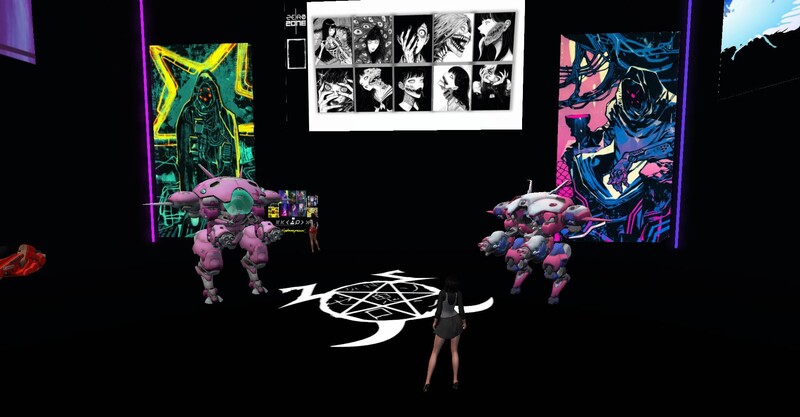
A variety of characters to take away.
Create your own scenarios.
The collection will be updated continuously.
hop://213.200.254.17:17002/Balabac Island Silent Souls
Puerto Azul Island
A nice place to relax.
hop://213.200.254.17:17002/Puerto Azul Island
Sim owner: Raklyn Heron
funny & useful signs

Latest store at Needful Things: More than Lights ( lamps & co. )

Unreal World Portal
hop://213.200.254.17:17002/Unreal World Portal



Flowerish & Pots - Huge collection of potted plants from all over the HyperGrid
New @ Needful Things: Lorulei - Ruth 2.0 Fashion, Shapes & Skins



Visit This Fantastic Default Island Right In The Middle Of This 1024x1024 Region On The Kara Islands Mini Grid!
 | Spax Orion: I have a region which looks like that on the ground... everything else is in the AIR! 1 hour ago |


I JUST RELEASED ANOTHER UPDATE...I added the ability in vs 3.5 to inject the material AND Blinn Phong Textures into the glb being uploaded. I also cleared up a bug that was causing a crash after one loads around 30 items in one upload. I believe it may be infinite. PROVE ME WRONG! When one uploades the glb it comes textured, you drag the glb from contents into your inventory so that it hits the database proper! Looking for more bugs. Let me know if you find them enjoy! Items will be on display HERE though construction is underway : hop://maze.bz:7002/Mesh%20Museum/128/128/28
This program will allow you to upload any mesh, rigged mesh, or not up to around 1 gigs about 20 files or so at once using an oar file! It auto chunks large meshes automatically. The items in the picture were over 2 million verts. It makes a sane physics map for you also . So despite the high verts, well the physics load is a lot lower than what you get with the viewer. It also will let you list all your oar contents in a text file...and well import it into blender with all the textures and placement just like in world!!! :-) Below is the help menu. and below that the download link.
FILE
Open OAR File: open a packaged .oar archive.
Open OAR Folder: open an extracted OAR working folder.
Convert Data: export the loaded OAR using the format from Tools > Output Format. It reads the existing OAR object XML and companion assets, then writes converted output files to disk.
Convert Data does not create a new LLMesh object or save a replacement object XML. The XML already exists in the loaded OAR and is used as export input.
FILE MENU COMPATIBILITY
The converter is only supported for OARs produced by the actual simulator. Repacked or reverse-injected OARs created by this program are not backward-compatible with the converter and may fail if reopened through File > Open OAR File or File > Open OAR Folder and then converted again.
IMPORT
Step One: create blank.oar and prepare an extracted working folder for injection.
Inject Mesh: add one .dae, .gltf, or .glb model into an extracted OAR. Set location, scale, physics, rigging, and LODs here.
Pack Oar: repack the extracted folder into a final .oar archive.
TOOLS
Objects List: browse objects in the loaded OAR and export selected objects through the normal OAR export pipeline.
Objects List > Export: export one or more selected OAR objects into an output folder. Depending on format, the app may write the main file under Solids or Phantoms and may also create companion folders such as Textures, MTL, or BIN.
Objects List > Export does not create a standalone mesh inventory object. It converts from the object's existing OAR XML and asset data.
Output Format: choose DAE, OBJ, GLTF, GLB, FBX, or STL for export.
Settings: set ranges, shifts, terrain options, and folder prefixes.
INJECT MESH DIALOG FIELDS
Source model: the .dae, .gltf, or .glb file to insert.
Location X/Y/Z: the final placement of the inserted object in the target OAR region.
Current dimensions: read-only size of the source model after analysis.
Scale: uniform size multiplier. 1.0 keeps original size.
Physics: choose how collision data is generated. File mode uses a separate physics model.
Rigged: treat the source as a rigged or avatar-style model.
Include Joint Positions: keep joint position data when rigged import needs it.
Strip Joint Data: remove rigging data and force a static-style result.
LOD High/Medium/Low/Lowest: control each generated LOD level.
Mode: choose how each LOD is derived.
Target Tris: desired triangle count for that LOD when the selected mode uses a target.
Vertices: read-only estimate of vertex count for each generated LOD.
WORKFLOW: OAR TO BLENDER USING GLB
1. Open Tools > Output Format and select GLB.
2. Open the source OAR with File > Open OAR File or Open OAR Folder.
3. Run File > Convert Data.
4. Import the generated .glb files into Blender with File > Import > glTF 2.0.
WORKFLOW: BUILD A REPACKED OAR WITH MULTIPLE MODELS
1. Run Import > Step One once to create a blank working OAR.
2. Run Import > Inject Mesh once for each model you want to add.
3. Source files can be .glb, .gltf, or .dae. Rigged avatar-style models can use the Rigged and joint options.
4. Repeat Inject Mesh until all assets are placed.
5. Run Import > Pack Oar to write the final repacked archive.
PLEASE DO ENJOY!!!!ONLY IN OPENSIM!Feel free to report bugs and or other worthy insights. I have written the original makers of it but not gotten any replies so I do no tknow if they are around or not. It is legal opensource though. THe list of contributors is there. If anyone knows them tell them to say hello...
https://maze.bz/OARConv.html
FILE
Open OAR File: open a packaged .oar archive.
Open OAR Folder: open an extracted OAR working folder.
Convert Data: export the loaded OAR using the format from Tools > Output Format. It reads the existing OAR object XML and companion assets, then writes converted output files to disk.
Convert Data does not create a new LLMesh object or save a replacement object XML. The XML already exists in the loaded OAR and is used as export input.
FILE MENU COMPATIBILITY
The converter is only supported for OARs produced by the actual simulator. Repacked or reverse-injected OARs created by this program are not backward-compatible with the converter and may fail if reopened through File > Open OAR File or File > Open OAR Folder and then converted again.
IMPORT
Step One: create blank.oar and prepare an extracted working folder for injection.
Inject Mesh: add one .dae, .gltf, or .glb model into an extracted OAR. Set location, scale, physics, rigging, and LODs here.
Pack Oar: repack the extracted folder into a final .oar archive.
TOOLS
Objects List: browse objects in the loaded OAR and export selected objects through the normal OAR export pipeline.
Objects List > Export: export one or more selected OAR objects into an output folder. Depending on format, the app may write the main file under Solids or Phantoms and may also create companion folders such as Textures, MTL, or BIN.
Objects List > Export does not create a standalone mesh inventory object. It converts from the object's existing OAR XML and asset data.
Output Format: choose DAE, OBJ, GLTF, GLB, FBX, or STL for export.
Settings: set ranges, shifts, terrain options, and folder prefixes.
INJECT MESH DIALOG FIELDS
Source model: the .dae, .gltf, or .glb file to insert.
Location X/Y/Z: the final placement of the inserted object in the target OAR region.
Current dimensions: read-only size of the source model after analysis.
Scale: uniform size multiplier. 1.0 keeps original size.
Physics: choose how collision data is generated. File mode uses a separate physics model.
Rigged: treat the source as a rigged or avatar-style model.
Include Joint Positions: keep joint position data when rigged import needs it.
Strip Joint Data: remove rigging data and force a static-style result.
LOD High/Medium/Low/Lowest: control each generated LOD level.
Mode: choose how each LOD is derived.
Target Tris: desired triangle count for that LOD when the selected mode uses a target.
Vertices: read-only estimate of vertex count for each generated LOD.
WORKFLOW: OAR TO BLENDER USING GLB
1. Open Tools > Output Format and select GLB.
2. Open the source OAR with File > Open OAR File or Open OAR Folder.
3. Run File > Convert Data.
4. Import the generated .glb files into Blender with File > Import > glTF 2.0.
WORKFLOW: BUILD A REPACKED OAR WITH MULTIPLE MODELS
1. Run Import > Step One once to create a blank working OAR.
2. Run Import > Inject Mesh once for each model you want to add.
3. Source files can be .glb, .gltf, or .dae. Rigged avatar-style models can use the Rigged and joint options.
4. Repeat Inject Mesh until all assets are placed.
5. Run Import > Pack Oar to write the final repacked archive.
PLEASE DO ENJOY!!!!ONLY IN OPENSIM!Feel free to report bugs and or other worthy insights. I have written the original makers of it but not gotten any replies so I do no tknow if they are around or not. It is legal opensource though. THe list of contributors is there. If anyone knows them tell them to say hello...
https://maze.bz/OARConv.html
👍👍👍
Prince Amor✦ ▸ Maze Grid Home 2 days ago
...
I am proud to announce my release of OarConv Reimagined. This program will allow you to upload any mesh, rigged mesh, or not up to around 1 gigs about 20 files or so at once using an oar file! It auto chunks large meshes automatically. The items in the picture were over 2 million verts. It makes a sane physics map for you also . So despite the high verts, well the physics load is a lot lower than what you get with the viewer. It also will let you list all your oar contents in a text file...and well import it into blender with all the textures and placement just like in world!!! :-) Below is the help menu. and below that the download link.
FILE
Open OAR File: open a packaged .oar archive.
Open OAR Folder: open an extracted OAR working folder.
Convert Data: export the loaded OAR using the format from Tools > Output Format. It reads the existing OAR object XML and companion assets, then writes converted output files to disk.
Convert Data does not create a new LLMesh object or save a replacement object XML. The XML already exists in the loaded OAR and is used as export input.
FILE MENU COMPATIBILITY
The converter is only supported for OARs produced by the actual simulator. Repacked or reverse-injected OARs created by this program are not backward-compatible with the converter and may fail if reopened through File > Open OAR File or File > Open OAR Folder and then converted again.
IMPORT
Step One: create blank.oar and prepare an extracted working folder for injection.
Inject Mesh: add one .dae, .gltf, or .glb model into an extracted OAR. Set location, scale, physics, rigging, and LODs here.
Pack Oar: repack the extracted folder into a final .oar archive.
TOOLS
Objects List: browse objects in the loaded OAR and export selected objects through the normal OAR export pipeline.
Objects List > Export: export one or more selected OAR objects into an output folder. Depending on format, the app may write the main file under Solids or Phantoms and may also create companion folders such as Textures, MTL, or BIN.
Objects List > Export does not create a standalone mesh inventory object. It converts from the object's existing OAR XML and asset data.
Output Format: choose DAE, OBJ, GLTF, GLB, FBX, or STL for export.
Settings: set ranges, shifts, terrain options, and folder prefixes.
INJECT MESH DIALOG FIELDS
Source model: the .dae, .gltf, or .glb file to insert.
Location X/Y/Z: the final placement of the inserted object in the target OAR region.
Current dimensions: read-only size of the source model after analysis.
Scale: uniform size multiplier. 1.0 keeps original size.
Physics: choose how collision data is generated. File mode uses a separate physics model.
Rigged: treat the source as a rigged or avatar-style model.
Include Joint Positions: keep joint position data when rigged import needs it.
Strip Joint Data: remove rigging data and force a static-style result.
LOD High/Medium/Low/Lowest: control each generated LOD level.
Mode: choose how each LOD is derived.
Target Tris: desired triangle count for that LOD when the selected mode uses a target.
Vertices: read-only estimate of vertex count for each generated LOD.
WORKFLOW: OAR TO BLENDER USING GLB
1. Open Tools > Output Format and select GLB.
2. Open the source OAR with File > Open OAR File or Open OAR Folder.
3. Run File > Convert Data.
4. Import the generated .glb files into Blender with File > Import > glTF 2.0.
WORKFLOW: BUILD A REPACKED OAR WITH MULTIPLE MODELS
1. Run Import > Step One once to create a blank working OAR.
2. Run Import > Inject Mesh once for each model you want to add.
3. Source files can be .glb, .gltf, or .dae. Rigged avatar-style models can use the Rigged and joint options.
4. Repeat Inject Mesh until all assets are placed.
5. Run Import > Pack Oar to write the final repacked archive.
PLEASE DO ENJOY!!!!ONLY IN OPENSIM!Feel free to report bugs and or other worthy insights. I have written the original makers of it but not gotten any replies so I do no tknow if they are around or not. It is legal opensource though. THe list of contributors is there. If anyone knows them tell them to say hello...
https://maze.bz/OARConv.html
This program will allow you to upload any mesh, rigged mesh, or not up to around 1 gigs about 20 files or so at once using an oar file! It auto chunks large meshes automatically. The items in the picture were over 2 million verts. It makes a sane physics map for you also . So despite the high verts, well the physics load is a lot lower than what you get with the viewer. It also will let you list all your oar contents in a text file...and well import it into blender with all the textures and placement just like in world!!! :-) Below is the help menu. and below that the download link.
FILE
Open OAR File: open a packaged .oar archive.
Open OAR Folder: open an extracted OAR working folder.
Convert Data: export the loaded OAR using the format from Tools > Output Format. It reads the existing OAR object XML and companion assets, then writes converted output files to disk.
Convert Data does not create a new LLMesh object or save a replacement object XML. The XML already exists in the loaded OAR and is used as export input.
FILE MENU COMPATIBILITY
The converter is only supported for OARs produced by the actual simulator. Repacked or reverse-injected OARs created by this program are not backward-compatible with the converter and may fail if reopened through File > Open OAR File or File > Open OAR Folder and then converted again.
IMPORT
Step One: create blank.oar and prepare an extracted working folder for injection.
Inject Mesh: add one .dae, .gltf, or .glb model into an extracted OAR. Set location, scale, physics, rigging, and LODs here.
Pack Oar: repack the extracted folder into a final .oar archive.
TOOLS
Objects List: browse objects in the loaded OAR and export selected objects through the normal OAR export pipeline.
Objects List > Export: export one or more selected OAR objects into an output folder. Depending on format, the app may write the main file under Solids or Phantoms and may also create companion folders such as Textures, MTL, or BIN.
Objects List > Export does not create a standalone mesh inventory object. It converts from the object's existing OAR XML and asset data.
Output Format: choose DAE, OBJ, GLTF, GLB, FBX, or STL for export.
Settings: set ranges, shifts, terrain options, and folder prefixes.
INJECT MESH DIALOG FIELDS
Source model: the .dae, .gltf, or .glb file to insert.
Location X/Y/Z: the final placement of the inserted object in the target OAR region.
Current dimensions: read-only size of the source model after analysis.
Scale: uniform size multiplier. 1.0 keeps original size.
Physics: choose how collision data is generated. File mode uses a separate physics model.
Rigged: treat the source as a rigged or avatar-style model.
Include Joint Positions: keep joint position data when rigged import needs it.
Strip Joint Data: remove rigging data and force a static-style result.
LOD High/Medium/Low/Lowest: control each generated LOD level.
Mode: choose how each LOD is derived.
Target Tris: desired triangle count for that LOD when the selected mode uses a target.
Vertices: read-only estimate of vertex count for each generated LOD.
WORKFLOW: OAR TO BLENDER USING GLB
1. Open Tools > Output Format and select GLB.
2. Open the source OAR with File > Open OAR File or Open OAR Folder.
3. Run File > Convert Data.
4. Import the generated .glb files into Blender with File > Import > glTF 2.0.
WORKFLOW: BUILD A REPACKED OAR WITH MULTIPLE MODELS
1. Run Import > Step One once to create a blank working OAR.
2. Run Import > Inject Mesh once for each model you want to add.
3. Source files can be .glb, .gltf, or .dae. Rigged avatar-style models can use the Rigged and joint options.
4. Repeat Inject Mesh until all assets are placed.
5. Run Import > Pack Oar to write the final repacked archive.
PLEASE DO ENJOY!!!!ONLY IN OPENSIM!Feel free to report bugs and or other worthy insights. I have written the original makers of it but not gotten any replies so I do no tknow if they are around or not. It is legal opensource though. THe list of contributors is there. If anyone knows them tell them to say hello...
https://maze.bz/OARConv.html
FILE
Open OAR File: open a packaged .oar archive.
Open OAR Folder: open an extracted OAR working folder.
Convert Data: export the loaded OAR using the format from Tools > Output Format. It reads the existing OAR object XML and companion assets, then writes converted output files to disk.
Convert Data does not create a new LLMesh object or save a replacement object XML. The XML already exists in the loaded OAR and is used as export input.
FILE MENU COMPATIBILITY
The converter is only supported for OARs produced by the actual simulator. Repacked or reverse-injected OARs created by this program are not backward-compatible with the converter and may fail if reopened through File > Open OAR File or File > Open OAR Folder and then converted again.
IMPORT
Step One: create blank.oar and prepare an extracted working folder for injection.
Inject Mesh: add one .dae, .gltf, or .glb model into an extracted OAR. Set location, scale, physics, rigging, and LODs here.
Pack Oar: repack the extracted folder into a final .oar archive.
TOOLS
Objects List: browse objects in the loaded OAR and export selected objects through the normal OAR export pipeline.
Objects List > Export: export one or more selected OAR objects into an output folder. Depending on format, the app may write the main file under Solids or Phantoms and may also create companion folders such as Textures, MTL, or BIN.
Objects List > Export does not create a standalone mesh inventory object. It converts from the object's existing OAR XML and asset data.
Output Format: choose DAE, OBJ, GLTF, GLB, FBX, or STL for export.
Settings: set ranges, shifts, terrain options, and folder prefixes.
INJECT MESH DIALOG FIELDS
Source model: the .dae, .gltf, or .glb file to insert.
Location X/Y/Z: the final placement of the inserted object in the target OAR region.
Current dimensions: read-only size of the source model after analysis.
Scale: uniform size multiplier. 1.0 keeps original size.
Physics: choose how collision data is generated. File mode uses a separate physics model.
Rigged: treat the source as a rigged or avatar-style model.
Include Joint Positions: keep joint position data when rigged import needs it.
Strip Joint Data: remove rigging data and force a static-style result.
LOD High/Medium/Low/Lowest: control each generated LOD level.
Mode: choose how each LOD is derived.
Target Tris: desired triangle count for that LOD when the selected mode uses a target.
Vertices: read-only estimate of vertex count for each generated LOD.
WORKFLOW: OAR TO BLENDER USING GLB
1. Open Tools > Output Format and select GLB.
2. Open the source OAR with File > Open OAR File or Open OAR Folder.
3. Run File > Convert Data.
4. Import the generated .glb files into Blender with File > Import > glTF 2.0.
WORKFLOW: BUILD A REPACKED OAR WITH MULTIPLE MODELS
1. Run Import > Step One once to create a blank working OAR.
2. Run Import > Inject Mesh once for each model you want to add.
3. Source files can be .glb, .gltf, or .dae. Rigged avatar-style models can use the Rigged and joint options.
4. Repeat Inject Mesh until all assets are placed.
5. Run Import > Pack Oar to write the final repacked archive.
PLEASE DO ENJOY!!!!ONLY IN OPENSIM!Feel free to report bugs and or other worthy insights. I have written the original makers of it but not gotten any replies so I do no tknow if they are around or not. It is legal opensource though. THe list of contributors is there. If anyone knows them tell them to say hello...
https://maze.bz/OARConv.html
👍👍👍
Prince Amor✦ ▸ Maze Grid Home 2 days ago
...
I am proud to announce my release of OarConv Reimagined. This program will allow you to upload any mesh, rigged mesh, or not up to around 1 gigs about 20 files or so at once using an oar file! It auto chunks large meshes automatically. The items in the picture were over 2 million verts. It makes a sane physics map for you also . So despite the high verts, well the physics load is a lot lower than what you get with the viewer. It also will let you list all your oar contents in a text file...and well import it into blender with all the textures and placement just like in world!!! :-) Below is the help menu. and below that the download link.
FILE
Open OAR File: open a packaged .oar archive.
Open OAR Folder: open an extracted OAR working folder.
Convert Data: export the loaded OAR using the format from Tools > Output Format. It reads the existing OAR object XML and companion assets, then writes converted output files to disk.
Convert Data does not create a new LLMesh object or save a replacement object XML. The XML already exists in the loaded OAR and is used as export input.
FILE MENU COMPATIBILITY
The converter is only supported for OARs produced by the actual simulator. Repacked or reverse-injected OARs created by this program are not backward-compatible with the converter and may fail if reopened through File > Open OAR File or File > Open OAR Folder and then converted again.
IMPORT
Step One: create blank.oar and prepare an extracted working folder for injection.
Inject Mesh: add one .dae, .gltf, or .glb model into an extracted OAR. Set location, scale, physics, rigging, and LODs here.
Pack Oar: repack the extracted folder into a final .oar archive.
TOOLS
Objects List: browse objects in the loaded OAR and export selected objects through the normal OAR export pipeline.
Objects List > Export: export one or more selected OAR objects into an output folder. Depending on format, the app may write the main file under Solids or Phantoms and may also create companion folders such as Textures, MTL, or BIN.
Objects List > Export does not create a standalone mesh inventory object. It converts from the object's existing OAR XML and asset data.
Output Format: choose DAE, OBJ, GLTF, GLB, FBX, or STL for export.
Settings: set ranges, shifts, terrain options, and folder prefixes.
INJECT MESH DIALOG FIELDS
Source model: the .dae, .gltf, or .glb file to insert.
Location X/Y/Z: the final placement of the inserted object in the target OAR region.
Current dimensions: read-only size of the source model after analysis.
Scale: uniform size multiplier. 1.0 keeps original size.
Physics: choose how collision data is generated. File mode uses a separate physics model.
Rigged: treat the source as a rigged or avatar-style model.
Include Joint Positions: keep joint position data when rigged import needs it.
Strip Joint Data: remove rigging data and force a static-style result.
LOD High/Medium/Low/Lowest: control each generated LOD level.
Mode: choose how each LOD is derived.
Target Tris: desired triangle count for that LOD when the selected mode uses a target.
Vertices: read-only estimate of vertex count for each generated LOD.
WORKFLOW: OAR TO BLENDER USING GLB
1. Open Tools > Output Format and select GLB.
2. Open the source OAR with File > Open OAR File or Open OAR Folder.
3. Run File > Convert Data.
4. Import the generated .glb files into Blender with File > Import > glTF 2.0.
WORKFLOW: BUILD A REPACKED OAR WITH MULTIPLE MODELS
1. Run Import > Step One once to create a blank working OAR.
2. Run Import > Inject Mesh once for each model you want to add.
3. Source files can be .glb, .gltf, or .dae. Rigged avatar-style models can use the Rigged and joint options.
4. Repeat Inject Mesh until all assets are placed.
5. Run Import > Pack Oar to write the final repacked archive.
PLEASE DO ENJOY!!!!ONLY IN OPENSIM!Feel free to report bugs and or other worthy insights. I have written the original makers of it but not gotten any replies so I do no tknow if they are around or not. It is legal opensource though. THe list of contributors is there. If anyone knows them tell them to say hello...
https://maze.bz/OARConv.html
| | Spax Orion: For those of you who want REPLACEMENT monsters for your IMAGE GAME MACHINE... THIS IS WHERE YOU GET THEM! Thanks Prince! 1 hour ago |

Hello! Kíl 'láa!
totem pole,
gyáa'aang.

Okay, so maybe you WON’T see Titanic here... or E.T., or Top Gun: Maverick. In fact, you won’t see ANYTHING the Motion Picture Academy has ever even HEARD of!
But we’ve got a selection of HOT videos at the Bare Essentials Theater that are guaranteed to "float your boat".
Come for the movies, stay for the atmosphere!
Showtimes & Location: hg.osgrid.org:80:Bare Essentials
But we’ve got a selection of HOT videos at the Bare Essentials Theater that are guaranteed to "float your boat".
Come for the movies, stay for the atmosphere!
Showtimes & Location: hg.osgrid.org:80:Bare Essentials
| | HarperHeld: can confirm! Kinda impressive, really. Make sure you're up for it, though. The Sound Of Music it ain't! 11 hours ago |

JOIN US FOR BI-WEEKLY LIVE WORKSHOPS, WORK ALONG WITH US, ASK QUESTIONS, AND MEET NEW PEOPLE. WE ALSO PROVIDE VIDEO TUTORIALS, LEARN AT YOUR OWN PACE.
DOING BOTH IS BETTER! REPETITION STRENGTHENS YOUR MEMORY.
Join our discord channel https://discord.gg/VastzPswvF
Check out the first part of our Making Flowers in Blender Class.
Part 1
https://youtu.be/4m24gtYEeJ4?si=acwcXldeoiaKtpvU
Part 2
https://youtu.be/s0ov56Shjgk?si=xGJnRsV8XroaM3d2
DOING BOTH IS BETTER! REPETITION STRENGTHENS YOUR MEMORY.
Join our discord channel https://discord.gg/VastzPswvF
Check out the first part of our Making Flowers in Blender Class.
Part 1
https://youtu.be/4m24gtYEeJ4?si=acwcXldeoiaKtpvU
Part 2
https://youtu.be/s0ov56Shjgk?si=xGJnRsV8XroaM3d2
| | NightshadeCeres: this was a really nice workshop, i liked it so much! you can ask questions at any time and, that is different to any blender-tutorials you do on your own: its specifically for osgrid use (so, no fanc... 13 hours ago |

#event #banhamregion 1pm SLT on April 29/2026 Arkham Grid

Checkmate in four moves?
| | falene hawks: hello easy shot, to place the X83 part in W12 and that's it 8 hours ago |

NEW Release SN Rose Beach Dress
Reborn Single
Alltime Moneygiver inside Mainstore
~NO RESELL~
NEW Release SN Rose Beach Dress
Legacy Single ( Reborn soon...)
Alltime Moneygiver inside Mainstore
~NO RESELL~
✨ Grand Opening: OtherLife Fashion! ✨
Looking for a style that breaks away from the conventional? The wait is over. We are excited to announce the grand opening of OtherLife Fashion, your new style benchmark in the metaverse.
🌟 100% Exclusive Content
At OtherLife Fashion, we don't believe in the generic. Every garment, accessory, and texture has been designed from scratch with exceptional attention to detail. Our entire catalog is exclusive content, created by and for residents seeking a unique identity in their virtual life.
📍 Where to find us?
We are located in one of the most vibrant spots on the grid:
Grid: Virtual Life Grid
Region: Welcome
Destination: Click here to teleport hop://grid.virtualife-grid.it:8002/Welcome/99/173/22
👗 What will you find?
Seasonal collections with original designs.
High-definition textures optimized for grid performance.
Fashion that adapts to your personality, from urban to high couture.
Don't settle for the usual. Come visit the store that is redefining aesthetics in Virtual Life Grid.
We look forward to seeing you in the Welcome region to discover your other life with the best style!
OtherLife Fashion: Be Different, Be You.
Looking for a style that breaks away from the conventional? The wait is over. We are excited to announce the grand opening of OtherLife Fashion, your new style benchmark in the metaverse.
🌟 100% Exclusive Content
At OtherLife Fashion, we don't believe in the generic. Every garment, accessory, and texture has been designed from scratch with exceptional attention to detail. Our entire catalog is exclusive content, created by and for residents seeking a unique identity in their virtual life.
📍 Where to find us?
We are located in one of the most vibrant spots on the grid:
Grid: Virtual Life Grid
Region: Welcome
Destination: Click here to teleport hop://grid.virtualife-grid.it:8002/Welcome/99/173/22
👗 What will you find?
Seasonal collections with original designs.
High-definition textures optimized for grid performance.
Fashion that adapts to your personality, from urban to high couture.
Don't settle for the usual. Come visit the store that is redefining aesthetics in Virtual Life Grid.
We look forward to seeing you in the Welcome region to discover your other life with the best style!
OtherLife Fashion: Be Different, Be You.

https://hgsafari.blogspot.com/2026/04/luscious-leshmor.htm...
We had our HG Safari tour on Wednesday and it was a lot of fun. If you want to get to know more about the Opensim World and the wonderful things people are creating and building, you should join us on an HG Safari tour. The image shows Leshmor's Deragona Island home of the dragons.
We had our HG Safari tour on Wednesday and it was a lot of fun. If you want to get to know more about the Opensim World and the wonderful things people are creating and building, you should join us on an HG Safari tour. The image shows Leshmor's Deragona Island home of the dragons.

The Ultimate Scavenger Hunt is now at Dismayland.
Every fountain in the PARK thinks it is the REAL Fountain of Youth.
One of them has distinctly different behavior or a lack thereof.
The wishing well is the universal pedagogy of pain and is excluded.
This Vaunted Fountain is Hidden in Plain Sight somewhere in the
park in a very public area... CAN YOU FIND IT?
Every fountain in the PARK thinks it is the REAL Fountain of Youth.
One of them has distinctly different behavior or a lack thereof.
The wishing well is the universal pedagogy of pain and is excluded.
This Vaunted Fountain is Hidden in Plain Sight somewhere in the
park in a very public area... CAN YOU FIND IT?
| | Spax Orion: Dirty Helga kept me up overnight, she wanted to stitch in a second way to WIN. So... there are TWO possible solutions... Both can get you on the BOARD, only one SOLVE gets the *STAR* by your name! yesterday |

Slip your inner viking lose and shake your battle axe to the best EDM.
(free viking battle makeup available)
hop://hg.osgrid.org:80/Misty%20Isles/591/893/23
♫ where the beat goes on ♫

▁ ▂ ▃ ▄ ▅ ▆ ▇ Electro - Music Festival ▇ ▆ ▅ ▄ ▃ ▂ ▁
▶▷▶ Sunday/Sonntag 12.April 2026
at the CC-Club – Peace and Love Stage
◕ starts 10:00 OS am grid time – startet ab 19:00 Uhr EU
Electronic music festival under the motto "Peace and Love" at our new open-air stage area in the CC-CLUB.
An intense experience of techno, house, trance, and EDM with light and special effects shows.
Immerse yourself in an unforgettable experience full of passion, love, and bliss!
Atmosphere: Focus on an immersive experience, community, freedom, and self-expression. Electronic music as a means for social cohesion and peace.
It also serves as a meeting place for an international fan base that connects dance, art, and architecture.
Taxi: hg.osgrid.org:80:CCClub
░░▒▓◙█◙█◙ THE – Peace and Love Stage ◙█◙█◙▓▒░░
Elektronisches Musikfestival unter dem Motto Peace and Love auf unserem neuen Open Air Stage Gelände im CC – CLUB.
Ein intensives Erlebnis aus Techno, House, Trance, EDM mit Licht und Effektshows.
Taucht ein in ein unvergessliches Erlebnis voller Wahnsinn, Liebe und Glückseligkeit!
Atmosphäre: Fokus auf immersives Erlebnis, Gemeinschaft, Freiheit und Selbstentfaltung. Elektronische Musik als Mittel für sozialen Zusammenhalt und Frieden.
Es dient auch als Treffpunkt für eine internationale Fangemeinde, die Tanz, Kunst und Architektur verbindet.
▶▷▶ Sunday/Sonntag 12.April 2026
at the CC-Club – Peace and Love Stage
◕ starts 10:00 OS am grid time – startet ab 19:00 Uhr EU
Electronic music festival under the motto "Peace and Love" at our new open-air stage area in the CC-CLUB.
An intense experience of techno, house, trance, and EDM with light and special effects shows.
Immerse yourself in an unforgettable experience full of passion, love, and bliss!
Atmosphere: Focus on an immersive experience, community, freedom, and self-expression. Electronic music as a means for social cohesion and peace.
It also serves as a meeting place for an international fan base that connects dance, art, and architecture.
Taxi: hg.osgrid.org:80:CCClub
░░▒▓◙█◙█◙ THE – Peace and Love Stage ◙█◙█◙▓▒░░
Elektronisches Musikfestival unter dem Motto Peace and Love auf unserem neuen Open Air Stage Gelände im CC – CLUB.
Ein intensives Erlebnis aus Techno, House, Trance, EDM mit Licht und Effektshows.
Taucht ein in ein unvergessliches Erlebnis voller Wahnsinn, Liebe und Glückseligkeit!
Atmosphäre: Fokus auf immersives Erlebnis, Gemeinschaft, Freiheit und Selbstentfaltung. Elektronische Musik als Mittel für sozialen Zusammenhalt und Frieden.
Es dient auch als Treffpunkt für eine internationale Fangemeinde, die Tanz, Kunst und Architektur verbindet.
| | Smaili Me: Χριστὸς ἀνέστη ! :) 21 hours ago |

| | Michael Leo: Stronger than ever ♥♥♥ 4 days ago |

ahahha problems solved .... I think that we had too many sharks waiting for you for dinner there.... I modifed few little things and restarted the region and it works much better... so the region is back ;-)
Adventure Land if not available at the moment... Someting I have put on the land is causing lag and troubles.... I am trying to find out where the problem comes from to fix all..... region will be back soon and working good again

✨ NEUES HIGHLIGHT IN LITTLE CITY! ✨
Es gibt Neuigkeiten, die ihr nicht verpassen dürft! Little City hat Zuwachs bekommen und wir laden euch ein, die neuesten Highlights zu entdecken.
| | CleaPerido: dankeschön 7 days ago |

Got a pic before the whole sim crashed, ONE of my earlier AI builder spheres still had non return prims and my sim went 370,000 prims over limit and crashed. Lost a months work but it will be fun to rebuild and then more carefully approach AI...

Live Traffic
|
3 |
Xtreme Surf A 5 0 |
|
3 |
Paradise Beach Cove A 9 1 |
|
4 |
GRAYWOLF PARADISE A 1 0 |
|
8 |
Xenotown A 23 0 |
|
4 |
Vanaheim A 16 4 |
|
3 |
Peaceful Spaces 3 0 |
|
3 |
Lakeview Mall 14 1 |
|
3 |
Trianon Complex A 102 21 |
|
6 |
ShoppingDance A 12 1 |
|
3 |
Lbsa Plaza 206 42 |
|
22 |
Alternate Metaverse 111 4 Happy Hour! |
|
3 |
Hypergrid Games 12 6 |
|
7 |
ALBA SEX CLUB A 51 4 |
|
4 |
Shopping FUN A 9 0 |
|
4 |
Playa de Wonderland A 10 0 |
|
Regions Online:
2,018
Active: 251 avatars in 153 regions | |


Upcoming Events
| view all |
| just now Alternate Metaverse 2 |
| in 59 minutes CarpeNoctem 0 |
| in 2 hours CarpeNoctem 0 |
| in 3 hours Alternate Metaverse 0 |
| in 3 hours Stark 0 |
| in 4 hours Alternate Metaverse 0 |
| in 4 hours The Sun Club 1 |
| in 4 hours Stark 0 |
| in 5 hours Nautilus Inclusive Keys 0 |
| in 5 hours Advantis 0 |
New Comments
Spax Orion✦ 1 hour ago
For those of you who want REPLACEMENT monsters for your IMAGE GAME MACHINE...
THIS IS WHERE YOU GET THEM! Thanks Prince!
context
Thirza Ember✔ 7 hours ago
I forgot to say, this is a photo of Monica Chanel's beautiful Venice region on Bloodmoonpack grid. We really appreciated all they did for us during this visit!
context
Gentle Dragonheart 8 hours ago
I think we must not forget they are amateurs, doing this for free in their spare time and pouring their heart and soul into it. Just like our DJs, builders, creators.. anyone who does more in Opensim ...
context
Mistressdalgato✦ 9 hours ago
That picture brings back memories to when I first came to opensim.
context
Reviews
Adventure Land
this is fun! went there for the turtle: it is a beautiful big turtle, that leads you (even as couple) through a turquoise sea. the whole sim is a paradise of prim art & architecture, cutest wood horse...
NightshadeCeres 14 hours ago
Mexico Lindo Shopping
Thank you for your comment. I will take your suggestion to create slimmer avatars into account, and I will keep you updated in the Facebook group and here. https://www.facebook.com/groups/251480078248...
Lina Kahlo 3 days ago
This region is a must visit beautiful makes you want to live there as soon as you land. Great build and so Homey love it I miss this Region so much I don't know what happened to it but I sure hope it...
Angel Dreams 4 days ago
Broceliande
Very well done, a Beautiful region!!
... made me wish I brought my fishing gear. ;)
Yinni Benelli 4 days ago
Gummybear Island
Klasse SIM. Endlich mal wieder eine Mall, auf der man nicht nur das Zeug findet, was man überall findet.
ADULT_LIFE 4 days ago
Shopping FUN
While i am a female, i had to see this place when i saw the Japanese pictures here on OSW. It was not a disappointment! The grounds are amazing, well laid out and it's just gorgeous! Thank you for b...
Annah Gestaga 5 days ago