OpenSimWorld is the directory of 3D Virtual Worlds based on OpenSimulator and connected through the HyperGrid. Learn More

|
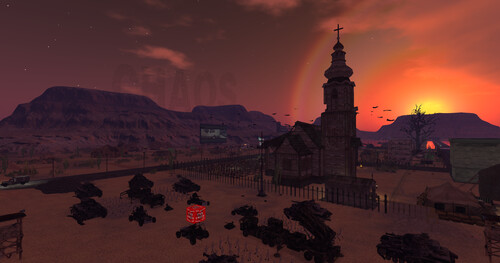
FEATURED Heaven & Hell 0 Users 10 1 A "Heaven & Hell – A journey through dual realms. Explore the fiery depths of Hell, a destination venue with immersive experiences and an outdoor movie drive-in. Ascend to Heaven, where diverse spiritua... |

Thats right another UPDATE 3.6 fixed up a weird bug where some LIDAR type meshes with more than one texture was being assigned only one texture. I fixed that right up. I say someone break this thing uploading 30 things at a time is really blowing my mind....
I JUST RELEASED ANOTHER UPDATE...I added the ability in vs 3.5 to inject the material AND Blinn Phong Textures into the glb being uploaded. I also cleared up a bug that was causing a crash after one loads around 30 items in one upload. I believe it may be infinite. PROVE ME WRONG! When one uploades the glb it comes textured, you drag the glb from contents into your inventory so that it hits the database proper! Looking for more bugs. Let me know if you find them enjoy! Items will be on display HERE though construction is underway : hop://maze.bz:7002/Mesh%20Museum/128/128/28
This program will allow you to upload any mesh, rigged mesh, or not up to around 1 gigs about 20 files or so at once using an oar file! It auto chunks large meshes automatically. The items in the picture were over 2 million verts. It makes a sane physics map for you also . So despite the high verts, well the physics load is a lot lower than what you get with the viewer. It also will let you list all your oar contents in a text file...and well import it into blender with all the textures and placement just like in world!!! :-) Below is the help menu. and below that the download link.
FILE
Open OAR File: open a packaged .oar archive.
Open OAR Folder: open an extracted OAR working folder.
Convert Data: export the loaded OAR using the format from Tools > Output Format. It reads the existing OAR object XML and companion assets, then writes converted output files to disk.
Convert Data does not create a new LLMesh object or save a replacement object XML. The XML already exists in the loaded OAR and is used as export input.
FILE MENU COMPATIBILITY
The converter is only supported for OARs produced by the actual simulator. Repacked or reverse-injected OARs created by this program are not backward-compatible with the converter and may fail if reopened through File > Open OAR File or File > Open OAR Folder and then converted again.
IMPORT
Step One: create blank.oar and prepare an extracted working folder for injection.
Inject Mesh: add one .dae, .gltf, or .glb model into an extracted OAR. Set location, scale, physics, rigging, and LODs here.
Pack Oar: repack the extracted folder into a final .oar archive.
TOOLS
Objects List: browse objects in the loaded OAR and export selected objects through the normal OAR export pipeline.
Objects List > Export: export one or more selected OAR objects into an output folder. Depending on format, the app may write the main file under Solids or Phantoms and may also create companion folders such as Textures, MTL, or BIN.
Objects List > Export does not create a standalone mesh inventory object. It converts from the object's existing OAR XML and asset data.
Output Format: choose DAE, OBJ, GLTF, GLB, FBX, or STL for export.
Settings: set ranges, shifts, terrain options, and folder prefixes.
INJECT MESH DIALOG FIELDS
Source model: the .dae, .gltf, or .glb file to insert.
Location X/Y/Z: the final placement of the inserted object in the target OAR region.
Current dimensions: read-only size of the source model after analysis.
Scale: uniform size multiplier. 1.0 keeps original size.
Physics: choose how collision data is generated. File mode uses a separate physics model.
Rigged: treat the source as a rigged or avatar-style model.
Include Joint Positions: keep joint position data when rigged import needs it.
Strip Joint Data: remove rigging data and force a static-style result.
LOD High/Medium/Low/Lowest: control each generated LOD level.
Mode: choose how each LOD is derived.
Target Tris: desired triangle count for that LOD when the selected mode uses a target.
Vertices: read-only estimate of vertex count for each generated LOD.
WORKFLOW: OAR TO BLENDER USING GLB
1. Open Tools > Output Format and select GLB.
2. Open the source OAR with File > Open OAR File or Open OAR Folder.
3. Run File > Convert Data.
4. Import the generated .glb files into Blender with File > Import > glTF 2.0.
WORKFLOW: BUILD A REPACKED OAR WITH MULTIPLE MODELS
1. Run Import > Step One once to create a blank working OAR.
2. Run Import > Inject Mesh once for each model you want to add.
3. Source files can be .glb, .gltf, or .dae. Rigged avatar-style models can use the Rigged and joint options.
4. Repeat Inject Mesh until all assets are placed.
5. Run Import > Pack Oar to write the final repacked archive.
PLEASE DO ENJOY!!!!ONLY IN OPENSIM!Feel free to report bugs and or other worthy insights. I have written the original makers of it but not gotten any replies so I do no tknow if they are around or not. It is legal opensource though. THe list of contributors is there. If anyone knows them tell them to say hello...
https://maze.bz/OARConv.html
FILE
Open OAR File: open a packaged .oar archive.
Open OAR Folder: open an extracted OAR working folder.
Convert Data: export the loaded OAR using the format from Tools > Output Format. It reads the existing OAR object XML and companion assets, then writes converted output files to disk.
Convert Data does not create a new LLMesh object or save a replacement object XML. The XML already exists in the loaded OAR and is used as export input.
FILE MENU COMPATIBILITY
The converter is only supported for OARs produced by the actual simulator. Repacked or reverse-injected OARs created by this program are not backward-compatible with the converter and may fail if reopened through File > Open OAR File or File > Open OAR Folder and then converted again.
IMPORT
Step One: create blank.oar and prepare an extracted working folder for injection.
Inject Mesh: add one .dae, .gltf, or .glb model into an extracted OAR. Set location, scale, physics, rigging, and LODs here.
Pack Oar: repack the extracted folder into a final .oar archive.
TOOLS
Objects List: browse objects in the loaded OAR and export selected objects through the normal OAR export pipeline.
Objects List > Export: export one or more selected OAR objects into an output folder. Depending on format, the app may write the main file under Solids or Phantoms and may also create companion folders such as Textures, MTL, or BIN.
Objects List > Export does not create a standalone mesh inventory object. It converts from the object's existing OAR XML and asset data.
Output Format: choose DAE, OBJ, GLTF, GLB, FBX, or STL for export.
Settings: set ranges, shifts, terrain options, and folder prefixes.
INJECT MESH DIALOG FIELDS
Source model: the .dae, .gltf, or .glb file to insert.
Location X/Y/Z: the final placement of the inserted object in the target OAR region.
Current dimensions: read-only size of the source model after analysis.
Scale: uniform size multiplier. 1.0 keeps original size.
Physics: choose how collision data is generated. File mode uses a separate physics model.
Rigged: treat the source as a rigged or avatar-style model.
Include Joint Positions: keep joint position data when rigged import needs it.
Strip Joint Data: remove rigging data and force a static-style result.
LOD High/Medium/Low/Lowest: control each generated LOD level.
Mode: choose how each LOD is derived.
Target Tris: desired triangle count for that LOD when the selected mode uses a target.
Vertices: read-only estimate of vertex count for each generated LOD.
I JUST RELEASED ANOTHER UPDATE...I added the ability in vs 3.5 to inject the material AND Blinn Phong Textures into the glb being uploaded. I also cleared up a bug that was causing a crash after one loads around 30 items in one upload. I believe it may be infinite. PROVE ME WRONG! When one uploades the glb it comes textured, you drag the glb from contents into your inventory so that it hits the database proper! Looking for more bugs. Let me know if you find them enjoy! Items will be on display HERE though construction is underway : hop://maze.bz:7002/Mesh%20Museum/128/128/28
This program will allow you to upload any mesh, rigged mesh, or not up to around 1 gigs about 20 files or so at once using an oar file! It auto chunks large meshes automatically. The items in the picture were over 2 million verts. It makes a sane physics map for you also . So despite the high verts, well the physics load is a lot lower than what you get with the viewer. It also will let you list all your oar contents in a text file...and well import it into blender with all the textures and placement just like in world!!! :-) Below is the help menu. and below that the download link.
FILE
Open OAR File: open a packaged .oar archive.
Open OAR Folder: open an extracted OAR working folder.
Convert Data: export the loaded OAR using the format from Tools > Output Format. It reads the existing OAR object XML and companion assets, then writes converted output files to disk.
Convert Data does not create a new LLMesh object or save a replacement object XML. The XML already exists in the loaded OAR and is used as export input.
FILE MENU COMPATIBILITY
The converter is only supported for OARs produced by the actual simulator. Repacked or reverse-injected OARs created by this program are not backward-compatible with the converter and may fail if reopened through File > Open OAR File or File > Open OAR Folder and then converted again.
IMPORT
Step One: create blank.oar and prepare an extracted working folder for injection.
Inject Mesh: add one .dae, .gltf, or .glb model into an extracted OAR. Set location, scale, physics, rigging, and LODs here.
Pack Oar: repack the extracted folder into a final .oar archive.
TOOLS
Objects List: browse objects in the loaded OAR and export selected objects through the normal OAR export pipeline.
Objects List > Export: export one or more selected OAR objects into an output folder. Depending on format, the app may write the main file under Solids or Phantoms and may also create companion folders such as Textures, MTL, or BIN.
Objects List > Export does not create a standalone mesh inventory object. It converts from the object's existing OAR XML and asset data.
Output Format: choose DAE, OBJ, GLTF, GLB, FBX, or STL for export.
Settings: set ranges, shifts, terrain options, and folder prefixes.
INJECT MESH DIALOG FIELDS
Source model: the .dae, .gltf, or .glb file to insert.
Location X/Y/Z: the final placement of the inserted object in the target OAR region.
Current dimensions: read-only size of the source model after analysis.
Scale: uniform size multiplier. 1.0 keeps original size.
Physics: choose how collision data is generated. File mode uses a separate physics model.
Rigged: treat the source as a rigged or avatar-style model.
Include Joint Positions: keep joint position data when rigged import needs it.
Strip Joint Data: remove rigging data and force a static-style result.
LOD High/Medium/Low/Lowest: control each generated LOD level.
Mode: choose how each LOD is derived.
Target Tris: desired triangle count for that LOD when the selected mode uses a target.
Vertices: read-only estimate of vertex count for each generated LOD.
WORKFLOW: OAR TO BLENDER USING GLB
1. Open Tools > Output Format and select GLB.
2. Open the source OAR with File > Open OAR File or Open OAR Folder.
3. Run File > Convert Data.
4. Import the generated .glb files into Blender with File > Import > glTF 2.0.
WORKFLOW: BUILD A REPACKED OAR WITH MULTIPLE MODELS
1. Run Import > Step One once to create a blank working OAR.
2. Run Import > Inject Mesh once for each model you want to add.
3. Source files can be .glb, .gltf, or .dae. Rigged avatar-style models can use the Rigged and joint options.
4. Repeat Inject Mesh until all assets are placed.
5. Run Import > Pack Oar to write the final repacked archive.
PLEASE DO ENJOY!!!!ONLY IN OPENSIM!Feel free to report bugs and or other worthy insights. I have written the original makers of it but not gotten any replies so I do no tknow if they are around or not. It is legal opensource though. THe list of contributors is there. If anyone knows them tell them to say hello...
https://maze.bz/OARConv.html
FILE
Open OAR File: open a packaged .oar archive.
Open OAR Folder: open an extracted OAR working folder.
Convert Data: export the loaded OAR using the format from Tools > Output Format. It reads the existing OAR object XML and companion assets, then writes converted output files to disk.
Convert Data does not create a new LLMesh object or save a replacement object XML. The XML already exists in the loaded OAR and is used as export input.
FILE MENU COMPATIBILITY
The converter is only supported for OARs produced by the actual simulator. Repacked or reverse-injected OARs created by this program are not backward-compatible with the converter and may fail if reopened through File > Open OAR File or File > Open OAR Folder and then converted again.
IMPORT
Step One: create blank.oar and prepare an extracted working folder for injection.
Inject Mesh: add one .dae, .gltf, or .glb model into an extracted OAR. Set location, scale, physics, rigging, and LODs here.
Pack Oar: repack the extracted folder into a final .oar archive.
TOOLS
Objects List: browse objects in the loaded OAR and export selected objects through the normal OAR export pipeline.
Objects List > Export: export one or more selected OAR objects into an output folder. Depending on format, the app may write the main file under Solids or Phantoms and may also create companion folders such as Textures, MTL, or BIN.
Objects List > Export does not create a standalone mesh inventory object. It converts from the object's existing OAR XML and asset data.
Output Format: choose DAE, OBJ, GLTF, GLB, FBX, or STL for export.
Settings: set ranges, shifts, terrain options, and folder prefixes.
INJECT MESH DIALOG FIELDS
Source model: the .dae, .gltf, or .glb file to insert.
Location X/Y/Z: the final placement of the inserted object in the target OAR region.
Current dimensions: read-only size of the source model after analysis.
Scale: uniform size multiplier. 1.0 keeps original size.
Physics: choose how collision data is generated. File mode uses a separate physics model.
Rigged: treat the source as a rigged or avatar-style model.
Include Joint Positions: keep joint position data when rigged import needs it.
Strip Joint Data: remove rigging data and force a static-style result.
LOD High/Medium/Low/Lowest: control each generated LOD level.
Mode: choose how each LOD is derived.
Target Tris: desired triangle count for that LOD when the selected mode uses a target.
Vertices: read-only estimate of vertex count for each generated LOD.
✨ Grand Opening: OtherLife Fashion! ✨
Looking for a style that breaks away from the conventional? The wait is over. We are excited to announce the grand opening of OtherLife Fashion, your new style benchmark in the metaverse.
🌟 100% Exclusive Content
At OtherLife Fashion, we don't believe in the generic. Every garment, accessory, and texture has been designed from scratch with exceptional attention to detail. Our entire catalog is exclusive content, created by and for residents seeking a unique identity in their virtual life.
📍 Where to find us?
We are located in one of the most vibrant spots on the grid:
Grid: Virtual Life Grid
Region: Welcome
Destination: Click here to teleport hop://grid.virtualife-grid.it:8002/Welcome/99/173/22
👗 What will you find?
Seasonal collections with original designs.
High-definition textures optimized for grid performance.
Fashion that adapts to your personality, from urban to high couture.
Don't settle for the usual. Come visit the store that is redefining aesthetics in Virtual Life Grid.
We look forward to seeing you in the Welcome region to discover your other life with the best style!
OtherLife Fashion: Be Different, Be You.
Looking for a style that breaks away from the conventional? The wait is over. We are excited to announce the grand opening of OtherLife Fashion, your new style benchmark in the metaverse.
🌟 100% Exclusive Content
At OtherLife Fashion, we don't believe in the generic. Every garment, accessory, and texture has been designed from scratch with exceptional attention to detail. Our entire catalog is exclusive content, created by and for residents seeking a unique identity in their virtual life.
📍 Where to find us?
We are located in one of the most vibrant spots on the grid:
Grid: Virtual Life Grid
Region: Welcome
Destination: Click here to teleport hop://grid.virtualife-grid.it:8002/Welcome/99/173/22
👗 What will you find?
Seasonal collections with original designs.
High-definition textures optimized for grid performance.
Fashion that adapts to your personality, from urban to high couture.
Don't settle for the usual. Come visit the store that is redefining aesthetics in Virtual Life Grid.
We look forward to seeing you in the Welcome region to discover your other life with the best style!
OtherLife Fashion: Be Different, Be You.

***New Outfits out Now***
- Legacy f/Perky/Petite
- Lara X/Lara X Petite
- Reborn
WHERE ?? in the NEW RELEASES SECTION !!!!

On your marks, get set, go!

Khiron Ametza Live
Monday, April 13th, 2026
3 pm @ Caraquet
Join us for an hour listening to great music among wonderful people!
Bring your happiness, family, and friends!!!
hop://groovyverse.com:8002/Caraquet/584/667/27
Monday, April 13th, 2026
3 pm @ Caraquet
Join us for an hour listening to great music among wonderful people!
Bring your happiness, family, and friends!!!
hop://groovyverse.com:8002/Caraquet/584/667/27

SAVE THE DATE: April 14th 10:00 AM
🚨 WOLF TECH • THE LEARNING ZONE • VWEC 🚨
PRESENT:
THE ULTIMATE ANIMATED GIF WORKSHOP
✨ Spark Ideas. Ignite Creativity. Enhance Your Creations. ✨
Create eye-catching GIFs and discover bold, new ways to use them.
Hands-on. Creative. Fun.
Perfect for builders, artists, and creators of all levels
📍 Location: The Curiosity Zone: hop://grid.curiosityzone.us:8002/The%20Learning%20Zone/128...
📅 Date: Tuesday, April 14, 2026
⏰ Time: 10:00 – 11:30 AM Grid Time
https://youtu.be/lWvixFyaMu0?si=ommcrjFDEcwgOxY3
🚨 WOLF TECH • THE LEARNING ZONE • VWEC 🚨
PRESENT:
THE ULTIMATE ANIMATED GIF WORKSHOP
✨ Spark Ideas. Ignite Creativity. Enhance Your Creations. ✨
Create eye-catching GIFs and discover bold, new ways to use them.
Hands-on. Creative. Fun.
Perfect for builders, artists, and creators of all levels
📍 Location: The Curiosity Zone: hop://grid.curiosityzone.us:8002/The%20Learning%20Zone/128...
📅 Date: Tuesday, April 14, 2026
⏰ Time: 10:00 – 11:30 AM Grid Time
https://youtu.be/lWvixFyaMu0?si=ommcrjFDEcwgOxY3


I just found a JUICY FAT BED-BUG on this site. When someone Blocks you, posting on the blocker's events is STILL Allowed! The person who posted the event will probably not see your comment, EVERYONE ELSE WILL!
So, if you blocked someone for 'calling out your non-compliance with the rules in the OSW FAQ', justice can and probably WILL come to you in your individual event listings. Mark ALL of your regions as GROUP (or RESTRICTED) if your host (zetaworlds) is kicking foreigners offline over privacy concerns, it is that SIMPLE.
This is one bug I hope Opensimworld NEVER fixes!
So, if you blocked someone for 'calling out your non-compliance with the rules in the OSW FAQ', justice can and probably WILL come to you in your individual event listings. Mark ALL of your regions as GROUP (or RESTRICTED) if your host (zetaworlds) is kicking foreigners offline over privacy concerns, it is that SIMPLE.
This is one bug I hope Opensimworld NEVER fixes!

Get ready for two hours of Soft Rock classics from the 70's and 80's. DJ Jon Temple will be spinning the sounds at the fabulous Myyst Club in London City, Gentle Fire grid. 12 m- 2pm Grid time.

Dude, anyone seen my ballroom?

DJ Dragon heute 17 bis 19 Uhr im Bikers Heaven heute mit Klassik Rock.
Nehmt Eure Freunde und kommt rüber zu Bikers Heaven.
Freu mich auf Euch
bis gleich
Dragon
DJane Dragon at Bikers Heaven TODAY 8 to 10 am gridtime today i´m playing
Classic Rock.
Take your friends and come over to Bikers Heaven and lets have some fun.
See you there
Dragon
hop://alternatemetaverse.com:8002/Carpe Noctem/209/221/1496
IM for a teleport
Listen: http://dragon.radioamv.com
Join us at https://alternatemetaverse.com
Nehmt Eure Freunde und kommt rüber zu Bikers Heaven.
Freu mich auf Euch
bis gleich
Dragon
DJane Dragon at Bikers Heaven TODAY 8 to 10 am gridtime today i´m playing
Classic Rock.
Take your friends and come over to Bikers Heaven and lets have some fun.
See you there
Dragon
hop://alternatemetaverse.com:8002/Carpe Noctem/209/221/1496
IM for a teleport
Listen: http://dragon.radioamv.com
Join us at https://alternatemetaverse.com

Dj Dave King for your Early Morning Breakfast show
It's MANIC MONDAYYYYYYYYYY!! Come join Our cowboy dave from 6am - 8am today at the morning breakfast show and show him how Manic Mondays are !!
Dave gives his best , come join him for a rodeo rideeee!!!
It's MANIC MONDAYYYYYYYYYY!! Come join Our cowboy dave from 6am - 8am today at the morning breakfast show and show him how Manic Mondays are !!
Dave gives his best , come join him for a rodeo rideeee!!!
✨ Grand Opening: OtherLife Fashion! ✨
Looking for a style that breaks away from the conventional? The wait is over. We are excited to announce the grand opening of OtherLife Fashion, your new style benchmark in the metaverse.
🌟 100% Exclusive Content
At OtherLife Fashion, we don't believe in the generic. Every garment, accessory, and texture has been designed from scratch with exceptional attention to detail. Our entire catalog is exclusive content, created by and for residents seeking a unique identity in their virtual life.
📍 Where to find us?
We are located in one of the most vibrant spots on the grid:
Grid: Virtual Life Grid
Region: Welcome
Destination: Click here to teleport hop://grid.virtualife-grid.it:8002/Welcome/99/173/22
👗 What will you find?
Seasonal collections with original designs.
High-definition textures optimized for grid performance.
Fashion that adapts to your personality, from urban to high couture.
Don't settle for the usual. Come visit the store that is redefining aesthetics in Virtual Life Grid.
We look forward to seeing you in the Welcome region to discover your other life with the best style!
OtherLife Fashion: Be Different, Be You.
Looking for a style that breaks away from the conventional? The wait is over. We are excited to announce the grand opening of OtherLife Fashion, your new style benchmark in the metaverse.
🌟 100% Exclusive Content
At OtherLife Fashion, we don't believe in the generic. Every garment, accessory, and texture has been designed from scratch with exceptional attention to detail. Our entire catalog is exclusive content, created by and for residents seeking a unique identity in their virtual life.
📍 Where to find us?
We are located in one of the most vibrant spots on the grid:
Grid: Virtual Life Grid
Region: Welcome
Destination: Click here to teleport hop://grid.virtualife-grid.it:8002/Welcome/99/173/22
👗 What will you find?
Seasonal collections with original designs.
High-definition textures optimized for grid performance.
Fashion that adapts to your personality, from urban to high couture.
Don't settle for the usual. Come visit the store that is redefining aesthetics in Virtual Life Grid.
We look forward to seeing you in the Welcome region to discover your other life with the best style!
OtherLife Fashion: Be Different, Be You.
Lovers shop

!!!!SAVE THE DATE!!!
🚨VWEC PRESENTS:
THE ULTIMATE ANIMATED GIF WORKSHOP
✨ Spark Ideas. Ignite Creativity. Bring Your Creations to Life. ✨
Create eye-catching GIFs and discover bold, new ways to use them.
Hands-on. Creative. Fun.
Perfect for builders, artists, and creators of all levels
📍 Location: The Curiosity Zone
📅 Date: April 14, 2026
⏰ Time: 10:00 AM Grid Time (allow for about an hour and a half as this is a complete workshop with space for significant Q&A)
hop://grid.curiosityzone.us:8002/Siren%20Sea/128/127/21
🚨VWEC PRESENTS:
THE ULTIMATE ANIMATED GIF WORKSHOP
✨ Spark Ideas. Ignite Creativity. Bring Your Creations to Life. ✨
Create eye-catching GIFs and discover bold, new ways to use them.
Hands-on. Creative. Fun.
Perfect for builders, artists, and creators of all levels
📍 Location: The Curiosity Zone
📅 Date: April 14, 2026
⏰ Time: 10:00 AM Grid Time (allow for about an hour and a half as this is a complete workshop with space for significant Q&A)
hop://grid.curiosityzone.us:8002/Siren%20Sea/128/127/21

Get your free Duosex cowboy hat today.
hop://hg.holoneon.com:80/Holoneon%20Welcome/182/117/27

Hello! Kíl 'láa!
totem pole,
gyáa'aang.
Hello! Kíl 'láa!
campsite: tlagánhlaa.

added grid search finally! searches avatars, places, items for sale on holoneon grid. click link to tp

Minimall_District is a "small" space created for you to enjoy a relaxing moment while shopping. Currently, we've only opened the women's clothing section, but we're still working on opening the men's clothing wing, accessories, avatars, and many more surprises to come. This space was created with all our passion for fashion, construction, and styling, and always with a personal touch from each of us who participated in its creation. Many more things are coming, and we hope you enjoy it as much as we do. https://opensimworld.com/hop/95171
light show
https://youtu.be/IrnzLFltYJk?si=5lEkhGlyn1WxEGYI
Tuesday, April 14th 10:00 AM join
WOLF TECH • THE LEARNING ZONE • VWEC
AS WE PRESENT:
THE ULTIMATE ANIMATED GIF Workshop
Spark Ideas. Ignite Creativity. Bring Your Creations to Life.
Create eye-catching GIFs and discover bold, new ways to use them.
Hands-on. Creative. Fun.
Perfect for builders, artists, and creators of all levels
Location: The Curiosity Zone: hop://grid.curiosityzone.us:8002/Siren%20Sea/128/127/21
Date: April 14, 2026
Time: 10:00 – 11:30 AM Grid Time (this of course depends on questions)
Tuesday, April 14th 10:00 AM join
WOLF TECH • THE LEARNING ZONE • VWEC
AS WE PRESENT:
THE ULTIMATE ANIMATED GIF Workshop
Spark Ideas. Ignite Creativity. Bring Your Creations to Life.
Create eye-catching GIFs and discover bold, new ways to use them.
Hands-on. Creative. Fun.
Perfect for builders, artists, and creators of all levels
Location: The Curiosity Zone: hop://grid.curiosityzone.us:8002/Siren%20Sea/128/127/21
Date: April 14, 2026
Time: 10:00 – 11:30 AM Grid Time (this of course depends on questions)

#event #banhamregion 1pm SLT on April 29/2026 Arkham Grid
✨ Grand Opening: OtherLife Fashion! ✨
Looking for a style that breaks away from the conventional? The wait is over. We are excited to announce the grand opening of OtherLife Fashion, your new style benchmark in the metaverse.
🌟 100% Exclusive Content
At OtherLife Fashion, we don't believe in the generic. Every garment, accessory, and texture has been designed from scratch with exceptional attention to detail. Our entire catalog is exclusive content, created by and for residents seeking a unique identity in their virtual life.
📍 Where to find us?
We are located in one of the most vibrant spots on the grid:
Grid: Virtual Life Grid
Region: Welcome
Destination: Click here to teleport hop://grid.virtualife-grid.it:8002/Welcome/99/173/22
👗 What will you find?
Seasonal collections with original designs.
High-definition textures optimized for grid performance.
Fashion that adapts to your personality, from urban to high couture.
Don't settle for the usual. Come visit the store that is redefining aesthetics in Virtual Life Grid.
We look forward to seeing you in the Welcome region to discover your other life with the best style!
OtherLife Fashion: Be Different, Be You.
Looking for a style that breaks away from the conventional? The wait is over. We are excited to announce the grand opening of OtherLife Fashion, your new style benchmark in the metaverse.
🌟 100% Exclusive Content
At OtherLife Fashion, we don't believe in the generic. Every garment, accessory, and texture has been designed from scratch with exceptional attention to detail. Our entire catalog is exclusive content, created by and for residents seeking a unique identity in their virtual life.
📍 Where to find us?
We are located in one of the most vibrant spots on the grid:
Grid: Virtual Life Grid
Region: Welcome
Destination: Click here to teleport hop://grid.virtualife-grid.it:8002/Welcome/99/173/22
👗 What will you find?
Seasonal collections with original designs.
High-definition textures optimized for grid performance.
Fashion that adapts to your personality, from urban to high couture.
Don't settle for the usual. Come visit the store that is redefining aesthetics in Virtual Life Grid.
We look forward to seeing you in the Welcome region to discover your other life with the best style!
OtherLife Fashion: Be Different, Be You.

more Stuff

NEW Release SN Rose Beach Dress
Reborn Single
Alltime Moneygiver inside Mainstore
~NO RESELL~
NEW Release SN Rose Beach Dress
Legacy Single ( Reborn soon...)
Alltime Moneygiver inside Mainstore
~NO RESELL~
✨ Grand Opening: OtherLife Fashion! ✨
Looking for a style that breaks away from the conventional? The wait is over. We are excited to announce the grand opening of OtherLife Fashion, your new style benchmark in the metaverse.
🌟 100% Exclusive Content
At OtherLife Fashion, we don't believe in the generic. Every garment, accessory, and texture has been designed from scratch with exceptional attention to detail. Our entire catalog is exclusive content, created by and for residents seeking a unique identity in their virtual life.
📍 Where to find us?
We are located in one of the most vibrant spots on the grid:
Grid: Virtual Life Grid
Region: Welcome
Destination: Click here to teleport hop://grid.virtualife-grid.it:8002/Welcome/99/173/22
👗 What will you find?
Seasonal collections with original designs.
High-definition textures optimized for grid performance.
Fashion that adapts to your personality, from urban to high couture.
Don't settle for the usual. Come visit the store that is redefining aesthetics in Virtual Life Grid.
We look forward to seeing you in the Welcome region to discover your other life with the best style!
OtherLife Fashion: Be Different, Be You.
Looking for a style that breaks away from the conventional? The wait is over. We are excited to announce the grand opening of OtherLife Fashion, your new style benchmark in the metaverse.
🌟 100% Exclusive Content
At OtherLife Fashion, we don't believe in the generic. Every garment, accessory, and texture has been designed from scratch with exceptional attention to detail. Our entire catalog is exclusive content, created by and for residents seeking a unique identity in their virtual life.
📍 Where to find us?
We are located in one of the most vibrant spots on the grid:
Grid: Virtual Life Grid
Region: Welcome
Destination: Click here to teleport hop://grid.virtualife-grid.it:8002/Welcome/99/173/22
👗 What will you find?
Seasonal collections with original designs.
High-definition textures optimized for grid performance.
Fashion that adapts to your personality, from urban to high couture.
Don't settle for the usual. Come visit the store that is redefining aesthetics in Virtual Life Grid.
We look forward to seeing you in the Welcome region to discover your other life with the best style!
OtherLife Fashion: Be Different, Be You.
DJ JEB @ SKINNY DIP 2-4am
Hey everyone, we have one fantastic DJ here at Skinny dip
Get ready to strip down and turn up.
Jeb will take you on a two-hour ear-gasmic music.
Bikinis, bare skin, and beats that don’t quit.
This is the night to break loose, own your freedom, and dance like nothing’s off-limits.
Be there, or hear about it later.
hop://alternatemetaverse.com:8002/Skinny%20Dip%20Beach/157...
Hey everyone, we have one fantastic DJ here at Skinny dip
Get ready to strip down and turn up.
Jeb will take you on a two-hour ear-gasmic music.
Bikinis, bare skin, and beats that don’t quit.
This is the night to break loose, own your freedom, and dance like nothing’s off-limits.
Be there, or hear about it later.
hop://alternatemetaverse.com:8002/Skinny%20Dip%20Beach/157...


https://hgsafari.blogspot.com/2026/04/luscious-leshmor.htm...
We had our HG Safari tour on Wednesday and it was a lot of fun. If you want to get to know more about the Opensim World and the wonderful things people are creating and building, you should join us on an HG Safari tour. The image shows Leshmor's Deragona Island home of the dragons.
We had our HG Safari tour on Wednesday and it was a lot of fun. If you want to get to know more about the Opensim World and the wonderful things people are creating and building, you should join us on an HG Safari tour. The image shows Leshmor's Deragona Island home of the dragons.

Premature on the Shoutcast Update. Pulled the message down and will relist when it's ready. Sorry about that.

Slip your inner viking lose and shake your battle axe to the best EDM.
(free viking battle makeup available)
hop://hg.osgrid.org:80/Misty%20Isles/591/893/23
♫ where the beat goes on ♫

ZERO ZONE STORE CYBERPUNK TRIBUTE
use vendor
hop://stellar-grid.ddns.net:8002/zero/177/180/23
✨ Grand Opening: OtherLife Fashion! ✨
Looking for a style that breaks away from the conventional? The wait is over. We are excited to announce the grand opening of OtherLife Fashion, your new style benchmark in the metaverse.
🌟 100% Exclusive Content
At OtherLife Fashion, we don't believe in the generic. Every garment, accessory, and texture has been designed from scratch with exceptional attention to detail. Our entire catalog is exclusive content, created by and for residents seeking a unique identity in their virtual life.
📍 Where to find us?
We are located in one of the most vibrant spots on the grid:
Grid: Virtual Life Grid
Region: Welcome
Destination: Click here to teleport hop://grid.virtualife-grid.it:8002/Welcome/99/173/22
👗 What will you find?
Seasonal collections with original designs.
High-definition textures optimized for grid performance.
Fashion that adapts to your personality, from urban to high couture.
Don't settle for the usual. Come visit the store that is redefining aesthetics in Virtual Life Grid.
We look forward to seeing you in the Welcome region to discover your other life with the best style!
OtherLife Fashion: Be Different, Be You.
Looking for a style that breaks away from the conventional? The wait is over. We are excited to announce the grand opening of OtherLife Fashion, your new style benchmark in the metaverse.
🌟 100% Exclusive Content
At OtherLife Fashion, we don't believe in the generic. Every garment, accessory, and texture has been designed from scratch with exceptional attention to detail. Our entire catalog is exclusive content, created by and for residents seeking a unique identity in their virtual life.
📍 Where to find us?
We are located in one of the most vibrant spots on the grid:
Grid: Virtual Life Grid
Region: Welcome
Destination: Click here to teleport hop://grid.virtualife-grid.it:8002/Welcome/99/173/22
👗 What will you find?
Seasonal collections with original designs.
High-definition textures optimized for grid performance.
Fashion that adapts to your personality, from urban to high couture.
Don't settle for the usual. Come visit the store that is redefining aesthetics in Virtual Life Grid.
We look forward to seeing you in the Welcome region to discover your other life with the best style!
OtherLife Fashion: Be Different, Be You.

♪ Live at ARV Club ♪
Enter a world of desert winds, golden sands, and ancient rhythms.
♫ Hypnotic beats and sensual movement
♫ Oriental fusion, tribal energy, and dark elegance
♫ Music of mystery, fire, and feminine power
♪ 1 Hour Live Set
♪ Bellydance & oriental vibes
♪ Exotic, seductive, and immersive
✿ Where : hg.neverworldgrid.com:8002:ARV Music Club
✿ When: 8 AM
♪ Attire: Mystical and bright
✿ ARVI LIVE ✿
Enter a world of desert winds, golden sands, and ancient rhythms.
♫ Hypnotic beats and sensual movement
♫ Oriental fusion, tribal energy, and dark elegance
♫ Music of mystery, fire, and feminine power
♪ 1 Hour Live Set
♪ Bellydance & oriental vibes
♪ Exotic, seductive, and immersive
✿ Where : hg.neverworldgrid.com:8002:ARV Music Club
✿ When: 8 AM
♪ Attire: Mystical and bright
✿ ARVI LIVE ✿
new shopp
DJ TYLER - MOONLIGHT SHOW
Wake up the right way with DJ Tyler, serving a wild mix of Rock, and Blues tunes to kickstart your morning.
📅Moonlight Show
⏰ 2-4 AM
Join us for an unforgettable session at the New Landing Point in Alternate Metaverse Grid!
Bring your friends, your dance shoes, and your love for great music. Let’s start the day with rhythm, connection, and pure virtual joy.
Hypergrid enabled – everyone is welcome!
hop://alternatemetaverse.com:8002/Alternate%20Metaverse/35...
Wake up the right way with DJ Tyler, serving a wild mix of Rock, and Blues tunes to kickstart your morning.
📅Moonlight Show
⏰ 2-4 AM
Join us for an unforgettable session at the New Landing Point in Alternate Metaverse Grid!
Bring your friends, your dance shoes, and your love for great music. Let’s start the day with rhythm, connection, and pure virtual joy.
Hypergrid enabled – everyone is welcome!
hop://alternatemetaverse.com:8002/Alternate%20Metaverse/35...
Rock-House (Special) am 10.04.2026.
💚Wieder einmal ein toller Abend im Rockhouse, danke.💚
..............................................................................................................
Rock House (Special) on April 10, 2026.
💚Another great evening at Rock House, thank you!💚
💚Wieder einmal ein toller Abend im Rockhouse, danke.💚
..............................................................................................................
Rock House (Special) on April 10, 2026.
💚Another great evening at Rock House, thank you!💚

Hey Guys!!! Go to the Flowers in Blender tab in our Discord Channel - to download all of the flower texture maps. Join our Discord Channel https://discord.gg/uUcFz5cVH6
I just released an update...I added the ability in vs 3.3 to inject the material into the glb being uploaded. When one uploades the glb it comes textured, you drag the glb from contents into your inventory so that it hits the database proper! Looking for more bugs. Let me know if you find them enjoy!
This program will allow you to upload any mesh, rigged mesh, or not up to around 1 gigs about 20 files or so at once using an oar file! It auto chunks large meshes automatically. The items in the picture were over 2 million verts. It makes a sane physics map for you also . So despite the high verts, well the physics load is a lot lower than what you get with the viewer. It also will let you list all your oar contents in a text file...and well import it into blender with all the textures and placement just like in world!!! :-) Below is the help menu. and below that the download link.
FILE
Open OAR File: open a packaged .oar archive.
Open OAR Folder: open an extracted OAR working folder.
Convert Data: export the loaded OAR using the format from Tools > Output Format. It reads the existing OAR object XML and companion assets, then writes converted output files to disk.
Convert Data does not create a new LLMesh object or save a replacement object XML. The XML already exists in the loaded OAR and is used as export input.
FILE MENU COMPATIBILITY
The converter is only supported for OARs produced by the actual simulator. Repacked or reverse-injected OARs created by this program are not backward-compatible with the converter and may fail if reopened through File > Open OAR File or File > Open OAR Folder and then converted again.
IMPORT
Step One: create blank.oar and prepare an extracted working folder for injection.
Inject Mesh: add one .dae, .gltf, or .glb model into an extracted OAR. Set location, scale, physics, rigging, and LODs here.
Pack Oar: repack the extracted folder into a final .oar archive.
TOOLS
Objects List: browse objects in the loaded OAR and export selected objects through the normal OAR export pipeline.
Objects List > Export: export one or more selected OAR objects into an output folder. Depending on format, the app may write the main file under Solids or Phantoms and may also create companion folders such as Textures, MTL, or BIN.
Objects List > Export does not create a standalone mesh inventory object. It converts from the object's existing OAR XML and asset data.
Output Format: choose DAE, OBJ, GLTF, GLB, FBX, or STL for export.
Settings: set ranges, shifts, terrain options, and folder prefixes.
INJECT MESH DIALOG FIELDS
Source model: the .dae, .gltf, or .glb file to insert.
Location X/Y/Z: the final placement of the inserted object in the target OAR region.
Current dimensions: read-only size of the source model after analysis.
Scale: uniform size multiplier. 1.0 keeps original size.
Physics: choose how collision data is generated. File mode uses a separate physics model.
Rigged: treat the source as a rigged or avatar-style model.
Include Joint Positions: keep joint position data when rigged import needs it.
Strip Joint Data: remove rigging data and force a static-style result.
LOD High/Medium/Low/Lowest: control each generated LOD level.
Mode: choose how each LOD is derived.
Target Tris: desired triangle count for that LOD when the selected mode uses a target.
Vertices: read-only estimate of vertex count for each generated LOD.
WORKFLOW: OAR TO BLENDER USING GLB
1. Open Tools > Output Format and select GLB.
2. Open the source OAR with File > Open OAR File or Open OAR Folder.
3. Run File > Convert Data.
4. Import the generated .glb files into Blender with File > Import > glTF 2.0.
WORKFLOW: BUILD A REPACKED OAR WITH MULTIPLE MODELS
1. Run Import > Step One once to create a blank working OAR.
2. Run Import > Inject Mesh once for each model you want to add.
3. Source files can be .glb, .gltf, or .dae. Rigged avatar-style models can use the Rigged and joint options.
4. Repeat Inject Mesh until all assets are placed.
5. Run Import > Pack Oar to write the final repacked archive.
PLEASE DO ENJOY!!!!ONLY IN OPENSIM!Feel free to report bugs and or other worthy insights. I have written the original makers of it but not gotten any replies so I do no tknow if they are around or not. It is legal opensource though. THe list of contributors is there. If anyone knows them tell them to say hello...
https://maze.bz/OARConv.html
FILE
Open OAR File: open a packaged .oar archive.
Open OAR Folder: open an extracted OAR working folder.
Convert Data: export the loaded OAR using the format from Tools > Output Format. It reads the existing OAR object XML and companion assets, then writes converted output files to disk.
Convert Data does not create a new LLMesh object or save a replacement object XML. The XML already exists in the loaded OAR and is used as export input.
FILE MENU COMPATIBILITY
The converter is only supported for OARs produced by the actual simulator. Repacked or reverse-injected OARs created by this program are not backward-compatible with the converter and may fail if reopened through File > Open OAR File or File > Open OAR Folder and then converted again.
IMPORT
Step One: create blank.oar and prepare an extracted working folder for injection.
Inject Mesh: add one .dae, .gltf, or .glb model into an extracted OAR. Set location, scale, physics, rigging, and LODs here.
Pack Oar: repack the extracted folder into a final .oar archive.
TOOLS
Objects List: browse objects in the loaded OAR and export selected objects through the normal OAR export pipeline.
Objects List > Export: export one or more selected OAR objects into an output folder. Depending on format, the app may write the main file under Solids or Phantoms and may also create companion folders such as Textures, MTL, or BIN.
Objects List > Export does not create a standalone mesh inventory object. It converts from the object's existing OAR XML and asset data.
Output Format: choose DAE, OBJ, GLTF, GLB, FBX, or STL for export.
Settings: set ranges, shifts, terrain options, and folder prefixes.
INJECT MESH DIALOG FIELDS
Source model: the .dae, .gltf, or .glb file to insert.
Location X/Y/Z: the final placement of the inserted object in the target OAR region.
Current dimensions: read-only size of the source model after analysis.
Scale: uniform size multiplier. 1.0 keeps original size.
Physics: choose how collision data is generated. File mode uses a separate physics model.
Rigged: treat the source as a rigged or avatar-style model.
Include Joint Positions: keep joint position data when rigged import needs it.
Strip Joint Data: remove rigging data and force a static-style result.
LOD High/Medium/Low/Lowest: control each generated LOD level.
Mode: choose how each LOD is derived.
Target Tris: desired triangle count for that LOD when the selected mode uses a target.
Vertices: read-only estimate of vertex count for each generated LOD.
WORKFLOW: OAR TO BLENDER USING GLB
1. Open Tools > Output Format and select GLB.
2. Open the source OAR with File > Open OAR File or Open OAR Folder.
3. Run File > Convert Data.
4. Import the generated .glb files into Blender with File > Import > glTF 2.0.
WORKFLOW: BUILD A REPACKED OAR WITH MULTIPLE MODELS
1. Run Import > Step One once to create a blank working OAR.
2. Run Import > Inject Mesh once for each model you want to add.
3. Source files can be .glb, .gltf, or .dae. Rigged avatar-style models can use the Rigged and joint options.
4. Repeat Inject Mesh until all assets are placed.
5. Run Import > Pack Oar to write the final repacked archive.
PLEASE DO ENJOY!!!!ONLY IN OPENSIM!Feel free to report bugs and or other worthy insights. I have written the original makers of it but not gotten any replies so I do no tknow if they are around or not. It is legal opensource though. THe list of contributors is there. If anyone knows them tell them to say hello...
https://maze.bz/OARConv.html
👍👍👍
Prince Amor✦ ▸ Maze Grid Home 2 days ago
...
I am proud to announce my release of OarConv Reimagined. This program will allow you to upload any mesh, rigged mesh, or not up to around 1 gigs about 20 files or so at once using an oar file! It auto chunks large meshes automatically. The items in the picture were over 2 million verts. It makes a sane physics map for you also . So despite the high verts, well the physics load is a lot lower than what you get with the viewer. It also will let you list all your oar contents in a text file...and well import it into blender with all the textures and placement just like in world!!! :-) Below is the help menu. and below that the download link.
FILE
Open OAR File: open a packaged .oar archive.
Open OAR Folder: open an extracted OAR working folder.
Convert Data: export the loaded OAR using the format from Tools > Output Format. It reads the existing OAR object XML and companion assets, then writes converted output files to disk.
Convert Data does not create a new LLMesh object or save a replacement object XML. The XML already exists in the loaded OAR and is used as export input.
FILE MENU COMPATIBILITY
The converter is only supported for OARs produced by the actual simulator. Repacked or reverse-injected OARs created by this program are not backward-compatible with the converter and may fail if reopened through File > Open OAR File or File > Open OAR Folder and then converted again.
IMPORT
Step One: create blank.oar and prepare an extracted working folder for injection.
Inject Mesh: add one .dae, .gltf, or .glb model into an extracted OAR. Set location, scale, physics, rigging, and LODs here.
Pack Oar: repack the extracted folder into a final .oar archive.
TOOLS
Objects List: browse objects in the loaded OAR and export selected objects through the normal OAR export pipeline.
Objects List > Export: export one or more selected OAR objects into an output folder. Depending on format, the app may write the main file under Solids or Phantoms and may also create companion folders such as Textures, MTL, or BIN.
Objects List > Export does not create a standalone mesh inventory object. It converts from the object's existing OAR XML and asset data.
Output Format: choose DAE, OBJ, GLTF, GLB, FBX, or STL for export.
Settings: set ranges, shifts, terrain options, and folder prefixes.
INJECT MESH DIALOG FIELDS
Source model: the .dae, .gltf, or .glb file to insert.
Location X/Y/Z: the final placement of the inserted object in the target OAR region.
Current dimensions: read-only size of the source model after analysis.
Scale: uniform size multiplier. 1.0 keeps original size.
Physics: choose how collision data is generated. File mode uses a separate physics model.
Rigged: treat the source as a rigged or avatar-style model.
Include Joint Positions: keep joint position data when rigged import needs it.
Strip Joint Data: remove rigging data and force a static-style result.
LOD High/Medium/Low/Lowest: control each generated LOD level.
Mode: choose how each LOD is derived.
Target Tris: desired triangle count for that LOD when the selected mode uses a target.
Vertices: read-only estimate of vertex count for each generated LOD.
WORKFLOW: OAR TO BLENDER USING GLB
1. Open Tools > Output Format and select GLB.
2. Open the source OAR with File > Open OAR File or Open OAR Folder.
3. Run File > Convert Data.
4. Import the generated .glb files into Blender with File > Import > glTF 2.0.
WORKFLOW: BUILD A REPACKED OAR WITH MULTIPLE MODELS
1. Run Import > Step One once to create a blank working OAR.
2. Run Import > Inject Mesh once for each model you want to add.
3. Source files can be .glb, .gltf, or .dae. Rigged avatar-style models can use the Rigged and joint options.
4. Repeat Inject Mesh until all assets are placed.
5. Run Import > Pack Oar to write the final repacked archive.
PLEASE DO ENJOY!!!!ONLY IN OPENSIM!Feel free to report bugs and or other worthy insights. I have written the original makers of it but not gotten any replies so I do no tknow if they are around or not. It is legal opensource though. THe list of contributors is there. If anyone knows them tell them to say hello...
https://maze.bz/OARConv.html
This program will allow you to upload any mesh, rigged mesh, or not up to around 1 gigs about 20 files or so at once using an oar file! It auto chunks large meshes automatically. The items in the picture were over 2 million verts. It makes a sane physics map for you also . So despite the high verts, well the physics load is a lot lower than what you get with the viewer. It also will let you list all your oar contents in a text file...and well import it into blender with all the textures and placement just like in world!!! :-) Below is the help menu. and below that the download link.
FILE
Open OAR File: open a packaged .oar archive.
Open OAR Folder: open an extracted OAR working folder.
Convert Data: export the loaded OAR using the format from Tools > Output Format. It reads the existing OAR object XML and companion assets, then writes converted output files to disk.
Convert Data does not create a new LLMesh object or save a replacement object XML. The XML already exists in the loaded OAR and is used as export input.
FILE MENU COMPATIBILITY
The converter is only supported for OARs produced by the actual simulator. Repacked or reverse-injected OARs created by this program are not backward-compatible with the converter and may fail if reopened through File > Open OAR File or File > Open OAR Folder and then converted again.
IMPORT
Step One: create blank.oar and prepare an extracted working folder for injection.
Inject Mesh: add one .dae, .gltf, or .glb model into an extracted OAR. Set location, scale, physics, rigging, and LODs here.
Pack Oar: repack the extracted folder into a final .oar archive.
TOOLS
Objects List: browse objects in the loaded OAR and export selected objects through the normal OAR export pipeline.
Objects List > Export: export one or more selected OAR objects into an output folder. Depending on format, the app may write the main file under Solids or Phantoms and may also create companion folders such as Textures, MTL, or BIN.
Objects List > Export does not create a standalone mesh inventory object. It converts from the object's existing OAR XML and asset data.
Output Format: choose DAE, OBJ, GLTF, GLB, FBX, or STL for export.
Settings: set ranges, shifts, terrain options, and folder prefixes.
INJECT MESH DIALOG FIELDS
Source model: the .dae, .gltf, or .glb file to insert.
Location X/Y/Z: the final placement of the inserted object in the target OAR region.
Current dimensions: read-only size of the source model after analysis.
Scale: uniform size multiplier. 1.0 keeps original size.
Physics: choose how collision data is generated. File mode uses a separate physics model.
Rigged: treat the source as a rigged or avatar-style model.
Include Joint Positions: keep joint position data when rigged import needs it.
Strip Joint Data: remove rigging data and force a static-style result.
LOD High/Medium/Low/Lowest: control each generated LOD level.
Mode: choose how each LOD is derived.
Target Tris: desired triangle count for that LOD when the selected mode uses a target.
Vertices: read-only estimate of vertex count for each generated LOD.
WORKFLOW: OAR TO BLENDER USING GLB
1. Open Tools > Output Format and select GLB.
2. Open the source OAR with File > Open OAR File or Open OAR Folder.
3. Run File > Convert Data.
4. Import the generated .glb files into Blender with File > Import > glTF 2.0.
WORKFLOW: BUILD A REPACKED OAR WITH MULTIPLE MODELS
1. Run Import > Step One once to create a blank working OAR.
2. Run Import > Inject Mesh once for each model you want to add.
3. Source files can be .glb, .gltf, or .dae. Rigged avatar-style models can use the Rigged and joint options.
4. Repeat Inject Mesh until all assets are placed.
5. Run Import > Pack Oar to write the final repacked archive.
PLEASE DO ENJOY!!!!ONLY IN OPENSIM!Feel free to report bugs and or other worthy insights. I have written the original makers of it but not gotten any replies so I do no tknow if they are around or not. It is legal opensource though. THe list of contributors is there. If anyone knows them tell them to say hello...
https://maze.bz/OARConv.html
FILE
Open OAR File: open a packaged .oar archive.
Open OAR Folder: open an extracted OAR working folder.
Convert Data: export the loaded OAR using the format from Tools > Output Format. It reads the existing OAR object XML and companion assets, then writes converted output files to disk.
Convert Data does not create a new LLMesh object or save a replacement object XML. The XML already exists in the loaded OAR and is used as export input.
FILE MENU COMPATIBILITY
The converter is only supported for OARs produced by the actual simulator. Repacked or reverse-injected OARs created by this program are not backward-compatible with the converter and may fail if reopened through File > Open OAR File or File > Open OAR Folder and then converted again.
IMPORT
Step One: create blank.oar and prepare an extracted working folder for injection.
Inject Mesh: add one .dae, .gltf, or .glb model into an extracted OAR. Set location, scale, physics, rigging, and LODs here.
Pack Oar: repack the extracted folder into a final .oar archive.
TOOLS
Objects List: browse objects in the loaded OAR and export selected objects through the normal OAR export pipeline.
Objects List > Export: export one or more selected OAR objects into an output folder. Depending on format, the app may write the main file under Solids or Phantoms and may also create companion folders such as Textures, MTL, or BIN.
Objects List > Export does not create a standalone mesh inventory object. It converts from the object's existing OAR XML and asset data.
Output Format: choose DAE, OBJ, GLTF, GLB, FBX, or STL for export.
Settings: set ranges, shifts, terrain options, and folder prefixes.
INJECT MESH DIALOG FIELDS
Source model: the .dae, .gltf, or .glb file to insert.
Location X/Y/Z: the final placement of the inserted object in the target OAR region.
Current dimensions: read-only size of the source model after analysis.
Scale: uniform size multiplier. 1.0 keeps original size.
Physics: choose how collision data is generated. File mode uses a separate physics model.
Rigged: treat the source as a rigged or avatar-style model.
Include Joint Positions: keep joint position data when rigged import needs it.
Strip Joint Data: remove rigging data and force a static-style result.
LOD High/Medium/Low/Lowest: control each generated LOD level.
Mode: choose how each LOD is derived.
Target Tris: desired triangle count for that LOD when the selected mode uses a target.
Vertices: read-only estimate of vertex count for each generated LOD.
WORKFLOW: OAR TO BLENDER USING GLB
1. Open Tools > Output Format and select GLB.
2. Open the source OAR with File > Open OAR File or Open OAR Folder.
3. Run File > Convert Data.
4. Import the generated .glb files into Blender with File > Import > glTF 2.0.
WORKFLOW: BUILD A REPACKED OAR WITH MULTIPLE MODELS
1. Run Import > Step One once to create a blank working OAR.
2. Run Import > Inject Mesh once for each model you want to add.
3. Source files can be .glb, .gltf, or .dae. Rigged avatar-style models can use the Rigged and joint options.
4. Repeat Inject Mesh until all assets are placed.
5. Run Import > Pack Oar to write the final repacked archive.
PLEASE DO ENJOY!!!!ONLY IN OPENSIM!Feel free to report bugs and or other worthy insights. I have written the original makers of it but not gotten any replies so I do no tknow if they are around or not. It is legal opensource though. THe list of contributors is there. If anyone knows them tell them to say hello...
https://maze.bz/OARConv.html
👍👍👍
Prince Amor✦ ▸ Maze Grid Home 2 days ago
...
I am proud to announce my release of OarConv Reimagined. This program will allow you to upload any mesh, rigged mesh, or not up to around 1 gigs about 20 files or so at once using an oar file! It auto chunks large meshes automatically. The items in the picture were over 2 million verts. It makes a sane physics map for you also . So despite the high verts, well the physics load is a lot lower than what you get with the viewer. It also will let you list all your oar contents in a text file...and well import it into blender with all the textures and placement just like in world!!! :-) Below is the help menu. and below that the download link.
FILE
Open OAR File: open a packaged .oar archive.
Open OAR Folder: open an extracted OAR working folder.
Convert Data: export the loaded OAR using the format from Tools > Output Format. It reads the existing OAR object XML and companion assets, then writes converted output files to disk.
Convert Data does not create a new LLMesh object or save a replacement object XML. The XML already exists in the loaded OAR and is used as export input.
FILE MENU COMPATIBILITY
The converter is only supported for OARs produced by the actual simulator. Repacked or reverse-injected OARs created by this program are not backward-compatible with the converter and may fail if reopened through File > Open OAR File or File > Open OAR Folder and then converted again.
IMPORT
Step One: create blank.oar and prepare an extracted working folder for injection.
Inject Mesh: add one .dae, .gltf, or .glb model into an extracted OAR. Set location, scale, physics, rigging, and LODs here.
Pack Oar: repack the extracted folder into a final .oar archive.
TOOLS
Objects List: browse objects in the loaded OAR and export selected objects through the normal OAR export pipeline.
Objects List > Export: export one or more selected OAR objects into an output folder. Depending on format, the app may write the main file under Solids or Phantoms and may also create companion folders such as Textures, MTL, or BIN.
Objects List > Export does not create a standalone mesh inventory object. It converts from the object's existing OAR XML and asset data.
Output Format: choose DAE, OBJ, GLTF, GLB, FBX, or STL for export.
Settings: set ranges, shifts, terrain options, and folder prefixes.
INJECT MESH DIALOG FIELDS
Source model: the .dae, .gltf, or .glb file to insert.
Location X/Y/Z: the final placement of the inserted object in the target OAR region.
Current dimensions: read-only size of the source model after analysis.
Scale: uniform size multiplier. 1.0 keeps original size.
Physics: choose how collision data is generated. File mode uses a separate physics model.
Rigged: treat the source as a rigged or avatar-style model.
Include Joint Positions: keep joint position data when rigged import needs it.
Strip Joint Data: remove rigging data and force a static-style result.
LOD High/Medium/Low/Lowest: control each generated LOD level.
Mode: choose how each LOD is derived.
Target Tris: desired triangle count for that LOD when the selected mode uses a target.
Vertices: read-only estimate of vertex count for each generated LOD.
WORKFLOW: OAR TO BLENDER USING GLB
1. Open Tools > Output Format and select GLB.
2. Open the source OAR with File > Open OAR File or Open OAR Folder.
3. Run File > Convert Data.
4. Import the generated .glb files into Blender with File > Import > glTF 2.0.
WORKFLOW: BUILD A REPACKED OAR WITH MULTIPLE MODELS
1. Run Import > Step One once to create a blank working OAR.
2. Run Import > Inject Mesh once for each model you want to add.
3. Source files can be .glb, .gltf, or .dae. Rigged avatar-style models can use the Rigged and joint options.
4. Repeat Inject Mesh until all assets are placed.
5. Run Import > Pack Oar to write the final repacked archive.
PLEASE DO ENJOY!!!!ONLY IN OPENSIM!Feel free to report bugs and or other worthy insights. I have written the original makers of it but not gotten any replies so I do no tknow if they are around or not. It is legal opensource though. THe list of contributors is there. If anyone knows them tell them to say hello...
https://maze.bz/OARConv.html
Neverworld builders!! Our shops at Never Village are open!

Live Traffic
|
4 |
Lady Godiva sex club adult social A 4 0 |
|
16 |
LinkUp Welcome 28 0 Happy Hour! |
|
7 |
ALBA SEX CLUB A 35 3 |
|
7 |
Gummybear Island 71 1 |
|
5 |
Ruritania A 28 11 |
|
4 |
Trianon Complex A 104 21 |
|
5 |
Xtreme Surf A 13 0 |
|
6 |
Roughnexx-Cathedral A 14 3 |
|
6 |
Lbsa Plaza 212 42 |
|
5 |
Bluewave 6 2 |
|
4 |
Vanaheim A 20 4 |
|
11 |
Binary Pulse Nexus A 4 0 |
|
6 |
Holoneon Welcome A 40 4 |
|
11 |
Event Plaza 143 17 |
|
5 |
Xenotown A 25 6 |
|
Regions Online:
1,982
Active: 364 avatars in 206 regions | |





Upcoming Events
| view all |
| 16 minutes ago Stark 0 |
|
Started Wednesday Event Plaza Osgrid
16 minutes ago
Event Plaza
0
|
|
Started LUCE and NIKI at CLUB69
16 minutes ago
Holoneon Welcome
1
|
| in 4 minutes The Meepz 0 |
|
Soon HG Safari Week 23
in 44 minutes
HG Safari
2
|
| in 44 minutes Stark 0 |
|
Soon DANCE MUSIC By GIO'
in 44 minutes
PalmBeach
3
|
| in 44 minutes Event Plaza 0 |
|
Soon ZEE Redux Party
in 44 minutes
Misty Isles
0
|
| in 44 minutes After Dark 0 |
New Comments
Gentle Dragonheart 35 minutes ago
I've done an inworld copy of my RL cat using a photo in Meshy, it works well as long as you balance the complexity of the mesh so it's not a gazillion vertices and crashes the sim :) Animated versions...
context
Aphra Hendrix✦ 1 hour ago
hey there, being servant to six cats, wow, i am really busy to serve just one. lol.
For creating just objects for a start, you could modify RL pictures of your cats wit AI and ask one of our mesh crea...
context
sofee supermarine 1 hour ago
Grab your Coffee and join us with DJ Whisper for the next 2 hours, its going to BEE BUZZINGGGGGGG!!
context
Aphra Hendrix✦ 3 hours ago
People who underline what they are not - why to mention things you dont want? It is a reflection for me for many years, when i see this "no drama" thing in opensim - just wanted to test here how much ...
context
Reviews
Free Life Gatsby Gardens
Beautiful, beautiful, beautiful!! I enjoy this place every time I come. So peaceful :) Thank you so much!!!
Jojo and Harmony 12 hours ago
Little Big City Shopping Mall
Connection refused
Why do you even list it here, if no one can get in??????
Disavowed yesterday
Masala Estates Office
We have had our Grid with Una for over two years and he has always been helpful to assist and to answer questions (I have a lot those) I do know that all people here have real life outside of the Virt...
Angel Dreams✦ yesterday
Free Life Great Gatsby
❤️ Love the place always good time there love lovingly built and a great place to visit Thank you Victor and Sis
Adore✦ yesterday
CCC-Shoppe
Even though CCC no longer posts new releases on OSW, CCC is and remains one of the best stores with unique clothing. Anyone who knows them knows where to go to find the new items. CCC also has a Disco...
Honeypot Starchild yesterday
Houses & Buildings
So nice to see that many of the houses on this region were copied from my regions. I enjoyed fixing them including scripting doors, correcting textures, and even creating matching g...
Victor DeAngelo✦ 2 days ago
Free Life Eliseium Elfinland
What a really great place !! This designer can repurpose things you have seen before and made them look brand new and there are also great items that you have never seen before. LOVED it!!!
kindra Turian 2 days ago
bdsm by maga
comment dire ... sans méchanceté. Et bien c'est moche vieux mal fait. Un lag digne de SL en 2006 ... hum hum pas intéressant me concernant.
Edith G. AUXIFUR 3 days ago
Mexico Lindo
My partner, could not reach the full avatar region, he ended up at some disneyland region.
Nyla_Veyne 3 days ago
